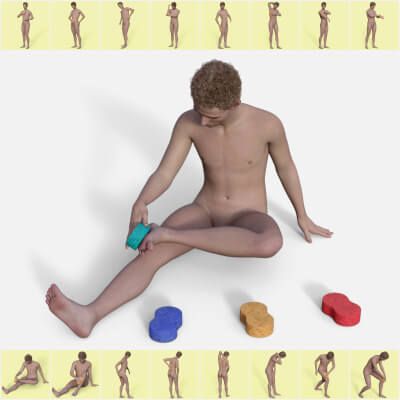
The Bath Sponge Poses for Genesis 9 product is a set of 16 hierarchical pose presets (plus mirrors) created for DAZ Studio Genesis 9 figures. The rigged and posable Sponge prop is also included and has
• 4 material presets and
• 2 texture and bump maps (4096 x 4096)
The hierarchical pose presets are:
BSP 01 Chest.duf
BSP 02 Arm.duf
BSP 03 Neck.duf
BSP 04 Belly.duf
BSP 05 Thigh.duf
BSP 06 Shin.duf
BSP 07 Back.duf
BSP 08 Lower Back.duf
BSP 09 Thigh Side.duf
BSP 10 Knee.duf
BSP 11 Elbow.duf
BSP 12 Buttock.duf
BSP 13 Armpit.duf
BSP 14 Side.duf
BSP 15 Sole.duf
BSP 16 Wrist.duf
BSP Sponge Loader.duf
The hierarchical pose presets work after activating the BSP Sponge Loader with the figure selected, the conventional way. Once activated, it then works with all 16 hierarchical pose presets.
In other words, before using hierarchical poses, the following actions have to be done.
• Make sure your Genesis 9 figure is selected in the Scene pane.
• Double click the loader preset to load the Sponge parented to the figure.
(Alternatively, parent the Sponge to the Genesis 9 figure root manually.)
• Use the hierarchical poses.
Unzip the product to your preferred Base Directory of Daz Studio containing the folders: data, People, Props, Runtime.
To use the material presets, please find the files at in the following location:
…\Props\Aesli\Sponge\Materials\