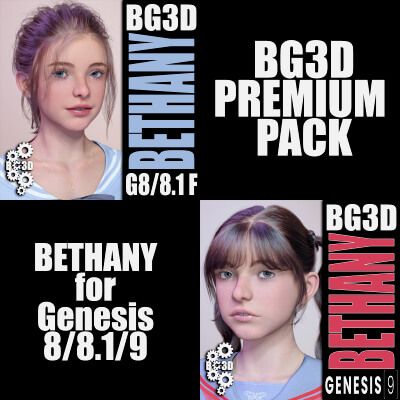
This Premium Pack includes Bethany for Genesis 8, 8,1 Females and the G9 Figure.
G8/8.1 BETHANY INFO:
-----------
DESCRIPTION:
Greetings! My specially crafted character Bethany is now available for the G8 character with my exclusive made Navel Geograft. I have also included my newly designed PBR SKIN for Bethany NE edition, with some updated additions to the materials. With 36 included morphs to help you mold this character to your scene, you will not have any issues with bends as with all my characters they are built for any pose. I take all the work out of it with my custom jcms, so all you will have to do is render away without the hassle of burying bad bends with layers of clothing or post-work to get rid of these errors. Each and every character is rebuilt in zBrush and the JCMs are directly custom to each character as well. So happy rendering!
General Navel Geograft Info:
I have created a separate UV for the G8 Perfect Navel (v1.0). This will allow the creator to manually create new skins for the Navel if the buyer knows how to use the DAZ transfer tool, and fix the seams in an editor. For the moment i am working on a script that will allow the user the ability to transfer the skin more easily. Unlike the G9 version, where I had to add geometry, the G8 version I had to remove and then re-add geometry. In future addition I will rework this, if the need arises.
So, for the moment, the G8 version will work with other G8 characters, but the buyer will need to make the adjustments to be able to use on other G8/8.1 Females to work correctly. I wanted to release these characters now, but i will be including a HOW-TO PDF at a later date to teach others to use the DAZ built-in texture transfer tool; albeit, they will still need to fix the textures with an editor. With the provided TransferUV I made it simple to correct these seams.
Please read the included documents for proper usage and limitations for the included geograft.
---
Basic Knowledge:
As with all my characters, they are based around the Joint Correction Morphs (JCMs), that help the buyer utilize the character without worrying about bad bends. Also, when making the JCMs, I make them easier to use with collisions so clothing will not clip through limbs when bends are closer to the body. Specifically, the Shins are Keyed JCMs!! Meaning they will start their bend cycle once the shin is closer to the back of the thigh (Bending the Shins all the way), giving a more realistic feel and look!
I take no short cuts in quality. I have taken the hard work out of corrections for you, so pose and get rendering quickly!!
The JCMs are baked into the Body or Head for their individual area morphs/bends to work correctly.
IMPORTANT NOTES:
I have included 2 Main Preloads as this will load any character seamlessly. These Preloads will get you started quickly! I have already provided the Preloads with each body part highlighted as a Favorite. ONCE the Preload is loaded, select the Figure, go to the Parameters Tab and Select Favorites. The Base and Athletic Presets for both Genesis 8 and 8.1 Female will load the Scaling only. NOTE: All key JCM's are tied into the Base Body, it is best to at least have the body dialed in above 60% for minimal use for JCM realism if you like to mix your own figure into Bethany.
Once one of Bethany's presets are dial in, there are a few manual dials for you to choose from. So if you load the PRESET, in Parameters TAB all KEY MORPHS will be in your favorites, so select Favorites and you will see everything you need to get running quickly and adjust what you like on the fly!
I have provided a couple of Manual Shaping Morphs to be utilized at the users command. Including one of the most important, for the FEET, this presets should be dialed to the same settings as the Body Dial Setting. I have provided a crucial (G8F Shoe Helper) to return the characters feet back into the original Genesis 8/8.1 Base. This will allow you to use ANY G8 shoes without distortion. It is highly recommended to use this ONLY when fitting shoes as the base characters feet are sculpted to that specific character and aesthetically pleasing versus the base G8 feet.
I have include a Clothing helper and its' Clothing Reducer with this character to help with most clothing. I have this morph highlighted as a favorite with the Preset Preloads so the user can dial it down if needed.
\/\/\/\/\/\/\/\/\/\/\/\/\/\/\/\/\/\/\/\/\/\/\/\/\/\/\/\/\/\/\/\/\/\/\/\/\/\/\/\/\/\/\/\/\/\/\/\/\/\/\/\/\/\/\/\/\/\/\/\/\/\/\/\/\/
BREAKDOWN:
2 Main Preloads - (1 for G8F and 1 for 8.1) - LOADS EVERYTHING YOU NEED
*** IMPORTANT NOTE: You must load the MAIN PRELOAD(s) to have everything loaded quickly, this is highly recommended!
36 Total Morphs:
-------
27 Total JCMs:
22 Joint Control Morphs/Corrections
5 Manual Joint Control Morphs - Hip/Thigh Morphs (**BONUS MORPHS: 2 Manual Hip/Thigh Corrections - 3 Automated Hip/Thigh Pose Correction)
7 Main/Helper Morphs:
1 Head
1 Body
1 Preset (Scaling Built In)
1 Iris Detail Morph
1 Reduce Clothing Helper
1 Smile Morph
1 AltChest Morph
2 Assist Morphs:
1 Shoe Helper Morph
1 Clothing Projection Morph
Genesis 8 Navel Morphs:
4 Bethany Specific JCM Morphs
_____________________________
**BONUS MORPHS:
NOTE: The provided Animated Poses are made to help the user with complex bends on the thighs and hip area. Use these helpers first when making complex bends, then adjust (Bends/Side2Side/Twist) as needed. When using Bend/Side together, usually on the G8 figure, there are dead zones where bends make very bad distortions, These are smooth and a must for any complex posing. I have eliminated bad key areas in the hips to thighs where these bends and errors occur.
If you choose NOT to use the automated ones, then bend the thighs in any pose, then utilized the 2 provided MANUAL LegOut sliders to fix the distortion in these areas.
________________________________
2 Fiber Brow Attachments
1 G8F Lashes
1 G8.1 Lashes
1 G8.1 Tear
2 Lip Shell for Lip makeup (G8/8.1)
Over 100 Skin/Makeup Options
***NEW PBR SKIN*** - 1 Customized IRAY PBR ONLY base texture (Same Presets for G8F / G8.1) - H. MAT will load all materials for all attachments, including Navel as long as they are attached.
UPDATED: 7 G8F Lashes Textures with 10 options with matching 7 NEW FIBER BROW II Colors (1 Base / 6 Colors)/ 3 Opacity Settings
7 BASE Brow Textures with 2 Opacity options
10 G8.1 Lashes Textures with 13 options
12 Eyeshadow Textures, 4 Metallic Settings, 2 Removal
9 Eye Textures
10 Lip (SHELL) Textures, 3 Masks, 1 Removal
4 LIE Layered Textures, 1 Helper (1 Freckles, 2 Face Blush, 1 Eyeliner, 1 Eyeliner Helper)
34 Nail Options (16 Fingernail Textures, 16 Toenail Textures, 2 Remove Options)
8 HDRi Render Options, 7 Settings
RECOMMENDATION: Render in SubD 3-4.
-------
NOTICE: I have noticed an increase in interfering JCMs from other vendors that are not properly linked to their respective characters, so be aware that when using my characters to check (Used Morphs) if you see an issue, as they are none when I make my JCMs.
****PLEASE READ the included ReadMe file to get the full info regarding this product and proper use****
INSTRUCTIONS:
Once downloaded, just drag and drop into your "My Library" folder to get started.
Open DAZ Studio and load a fresh Genesis 8 or recommended PRELOADS.
Once the base G8/8.1F is loaded, there are a few options to load:
1. Search the Parameters Tab to locate the morphs and you can manually dial them in.
2. Alternatively go to your Content Library and under /People/Genesis 8 Female/Characters/BG3D/ you can find the PRELOAD and other presets in the next folders already made for you to get started quickly.
**NOTE: The PRELOAD preset will apply all attachments; as well as, scaling AND textures for all items. If you wish to mix and match with other morphs please remove preset by using the provided preset for each type of model chosen, OR manually dial them out in the parameters tab.
The materials folder contains a full character material preset for IRAY ONLY!
Tips/Recommendations: All of my characters work best with dForce clothing, so it is recommended to use them whenever possible. It is not necessary to use dForce to get great results, just a personal preference. Increase smoothing on clothing (3-5 smoothing) to assist as well; but I have tested many clothing and fits a modest amount of clothing very well without assistance or aid of other morphs.
Hair and clothing used in promos are NOT included.
+++
+++
G9 BETHANY INFO:
--------
DESCRIPTION:
Greetings! My specially crafted character Bethany is now available for the G9 character with my exclusive included Naval Geograft; as well as, a newly designed skin with a few other material options as well. Read below (Breakdown) for full details.
General Navel Info:
I never really liked the placement of the stock G9 Navel and I have found it too low on the body to be anatomically correct. So I did a little experimenting and came up with a Navel Attachment that comes with its own JCM corrections for some of my character and Bethany G9 has joined these characters.
Buyers CAN use this NAVEL GEOGRAFT model on their own G9 characters, but will have to know how to adjust skin to look correctly on their own creations. HD Morphs do not translate through the geograft, so Bethany G9 has a built in correction to zero-out the HD Navel base setting. If you want to use the navel, just dial out and lock the HD Navel on the G9.
The Naval attachment also has two material zones, (Navel / Body), so any G9 Texture will work seamlessly when applied. THE USER MUST KNOW how to make correction to the textures (PhotoShop/GIMP/etc‥) if applying any texture other than the provided ones for Bethany. This will work on other characters I have release that have the same skin, and I will provide a list for them at a later date. However, I have NOT tested the Navel with JCM bends on my other characters to see how they will react well, as with all my characters, I make specific JCMs for all abdomen bends. Since the placement of the Navel has shifted from the base G9, there might be some distortions.
Buyer must read the included documentation for proper usage.
The provided PRELOAD will load Bethany G9 with all attachments and the NEW BG3D G9 PerfectNavel v1.1.
___________________________________________
Basic Knowledge of all BG3D Releases:
As with all my characters, they are based around the Joint Correction Morphs (JCMs), that help the buyer utilize the character without worrying about bad bends. Also, when making the JCMs, I make them easier to use with collisions so clothing will not clip through limbs when bends are closer to the body. Specifically, the Shins are Keyed JCMs!! Meaning they will start their bend cycle once the shin is closer to the back of the thigh (Bending the Shins all the way), giving a more realistic feel and look!
I take no short cuts in quality. I have taken the hard work out of corrections for you, so pose and get rendering quickly!!
The JCMs are baked into the Body or Head for their individual area morphs/bends to work correctly.
IMPORTANT NOTES:
I have included 1 Main Preload as this will load the character seamlessly. These Preloads will get you started quickly! I have already provided the Preload with each body part highlighted as a Favorite. ONCE the Preload is loaded, select the Figure, go to the Parameters Tab and Select Favorites. The Main Presets will load the Scaling only. NOTE: All JCM's are tied into the Base Body, it is best to at least have the body dialed in above 60% for minimal use for JCM realism if you like to mix your own figure with this figure.
Once Bethany for G9 preset is dialed in, there are a few manual dials for you to choose from. So if you load the PRESET, in Parameters TAB all KEY MORPHS will be in your favorites, so select Favorites and you will see everything you need to get running quickly and adjust what you like on the fly!
I have provided a couple of Manual Shaping Morphs to be utilized at the users command. Including one of the most important, for the FEET, and this presets should be dialed to the same settings as Bethany' Body Dial Setting. I have provided a crucial (G9 Shoe Helper Morph) to use ANY G9 shoes without distortion. It is highly recommended to use this ONLY when fitting shoes as the base characters feet are sculpted to that specific character and aesthetically pleasing versus the base G9 feet.
I have included a Clothing Helper Morph with this character.
\/\/\/\/\/\/\/\/\/\/\/\/\/\/\/\/\/\/\/\/\/\/\/\/\/\/\/\/\/\/\/\/\/\/\/\/\/\/\/\/\/\/\/\/\/\/\/\/\/\/\/\/\/\/\/\/\/\/\/\/\/\/\/\/\/
BREAKDOWN:
1 Main Preload - (also Loads G9 PerfectNavel v1.1) - LOADS EVERYTHING YOU NEED
*** IMPORTANT NOTE: You must load the MAIN PRELOAD(s) to have everything loaded quickly, this is highly recommended!
37 Total Morphs:
29 specialized JCMs(Joint Correction Morphs)/Shape Helper Morphs
8 Main/Helper Morphs
* 1 PRESET - (SCALING built in)
* 1 Head Morph
* 1 Body Morph
* 1 Shoe Helper Morph (Fit ANY G9 shoes)
* 1 Flex Control
* 1 Clothing Helper
* 1 Reduce Clothing Helper - Helps with some clothing that already has clothing helpers built-in.
* 1 AltChest Morph
3 Anatomy Morph(s):
* 1 Sculpted Mouth/Teeth Morph - Custom Morphs
* 1 Sculpted Eye Morph - Molded to Character
* 1 Sculpted BrowII Morph - Molded to Character
8 Add-On Anatomy:
3 Fiber Brow Attachment
1 NEW Fiber Brow II Attachment
1 G9 Eyes
1 G9 Lashes
1 G9 Tear
1 G9 Mouth
1 BONUS NEW Add-On Anatomy/ BG3D G9 PerfectNavel v1.1:
* Included 1 Base / 3 Basic / 5 Bethany specific Morphs/Corrections.
* Includes 1 PBR Skin for the Navel to work seamlessly for Bethany G9.
* The Geograft will include a future expansion and future version with higher detail.
Well Over 500 Skin/Makeup Options
***NEW PBR SKIN*** 1 Customized H. MAT PBR IRAY ONLY base texture (H.Mat Preset that loads all textures for all attachments and figures)
Brows: 12 Brow Textures with 4 Opacity options - 3 Base Settings
Brows II: 6 Colors / 3 Settings
Eyes: 1 Base Eye Settings / 16 Eye Textures (8 Light / 8 Dark)
Lashes: 8 Eyelash Textures, 4 Style, 2 Opacity Settings - 3 Base Settings
18 Layered Eyeshadow Textures
NEW UPDATED - 15 Lip Colors with 1 Just Gloss, 1 Dull, 1 Gloss, 1 Reset (NOTE: You can get different effects by applying the color first and then using the 2 different gloss settings and or the dull setting; so, there are differnt colors and looking that can be achieved with using these settings along side the chosen color.
10 LIE Layered Textures (2 Freckles, 2 Face Blush, 4 Eyeliner, 1 Football, 1 Meow)
90 Nail Options (44 Fingernail Textures, 44 Toenail Textures, 2 Reset Options - Over 1900 Combinations)
8 HDRi Render Options, 7 Settings
RECOMMENDATION: Render in SubD 3-4.
---------
NOTICE: I have noticed an increase in interfering JCMs from other vendors that are not properly linked to their respective characters, so be aware that when using my characters to check (Used Morphs) if you see an issue, as they are none when I make my jcms.
****PLEASE READ the included ReadMe file to get the full info regarding this product and proper use****
INSTRUCTIONS:
Once downloaded, just drag and drop into your "My Library" folder to get started.
Open DAZ Studio and load a fresh Genesis 9 or recommended PRELOAD.
**NOTE: The PRELOAD preset(s) will apply all attachments, (unlock bones/parameters - if applicable); as well as, scaling AND textures for all items. If you wish to mix and match with other morphs please remove preset by manually dialing them out in the parameters tab.
The materials folder contains a full character material preset for IRAY ONLY!
Tips/Recommendations: All of my characters work best with dForce clothing, so it is recommended to use them whenever possible. It is not necessary to use dForce to get great results, just a personal preference. Increase smoothing on clothing (3-5 smoothing) to assist as well; but I have tested many clothing and fits a modest amount of clothing very well without assistance or aid of other morphs.
Hair and clothing used in promos are NOT included.
Be sure to check out my other product(s) as well. https://www.renderhub.com/biogearz3d
Have fun!!! Please return and post up your Renders!
PLEASE return after purchase and post some renders, like and rate give (stars) to your favorite BiogearZ3D Character(s) and contact me if you have any issues via site DM!
BioGearz3D