================================================================================
IMPORTANT: If you previously purchased the G3 version of Essence or Rising, there is no need to buy this product. Your existing purchase has been updated to include the G9 version. Please check your account and download the latest updates!
================================================================================
Please read carefully, as this is an extensive description:
-------------------------------------------------------
This product holds a special place in my heart—it was my very first complete outfit set, released back in 2017. Since returning to 3D design with years of additional experience and mastery of new software, I knew I had to revisit this set. I wanted to give it a massive update that truly aligns with my current style and quality standards.
As a result, the product has undergone a massive revamp—so extensive that it’s hard to detail every single change without turning this readme into a novel!
⚙️ PRODUCT FEATURES
--------------------------------------------------------------------------------
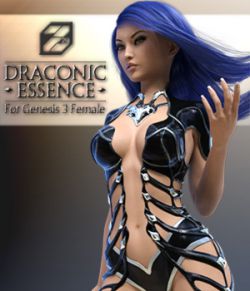
The package includes:
[ Draconic Essence Set ]
○ Draconic Shoulders
○ Draconic Body
○ Draconic Panties (dForce)
[ Draconic Rising Set ]
○ Draconic Helmet
○ Draconic Mesh Body (Genesis 9 GeoShell)
○ Draconic Bracers
○ Draconic Leg Adornment
○ Draconic Boots (Includes a Wearable version that automatically applies the “HighHeels” pose upon loading).
► Rigging & Compatibility: The rigging for all components has been updated for Genesis 9 and tested on a wide variety of characters, including:
3DA Lark, Ally 9, Amala, Amelia 9, Angela 9, Death 9, Death 9 Toned, Freja 9, Hanako 9, Jennie 9 (Curvy/Lean/Thin), Joan 9, Josie 9, Julia 9, Kala 9, Kara 9 (Heavy/Buff), Karmen 9, Valenia 9, Ivar 9, Zack 9, Ty, Thomas 9, and more.
🎨 IRAY MATERIALS
--------------------------------------------------------------------------------
Full Sets (Hierarchical Materials)
To use these, select your Genesis 9 figure first. These presets allow you to quickly apply metals, leathers, or latex to all equipped items at once.
Note: You can also choose to apply materials and colors to each component individually (Shoulders, Body, Panties, etc.) for a customized look.
Draconic Essence Set:
├─ Latex V1 (12 colors): A clean version without seams or studs.
├─ Latex V2 (9 colors): This version includes detailed seams and studs.
├─ Leather (10 colors): High-quality leather textures.
├─ Metal V1 (12 colors): Features the "standard" metals used across my product line for visual consistency.
└─ Metal V2 (6 colors/variants): Brand new to my catalog. Created for an epic, fantasy look; these are "celestial" or immaculate metals. Unlike V1, these are pristine and show no wear.
Draconic Rising Set:
├─ Metal V1 & V2: (Same as above).
└─ Meshbody: 5 pattern/mesh variants with 9 colors each.
► Customizable Surfaces (Mix & Match)
The original design was built to allow combining different metals on a single object. You can apply ALL metal presets to the following specific surfaces:
├─ Draconic Shoulders: Neck adornment and dragon.
├─ Draconic Body: Clasps/Buckles.
├─ Draconic Helmet: 6 distinct surfaces: Horns Long, Horns Short, Layer 1 (Middle), Layer 2 (Eyebrow), Layer 3 (Sides), Layer 4 (Sides).
├─ Leg Adornment: Leg Ring and Leg Adornment.
└─ Boots: 9 distinct surfaces: Knee, Shin, Foot, Metal, Base 1, Base 2, Base 3, Heel, and Heel Point.
🛠 MORPHS & ADJUSTMENTS
--------------------------------------------------------------------------------
The list is extensive, but I wanted to ensure maximum flexibility. All morphs are accessible via: Select Figure > Parameters > Morphs-Fixes.
├─ Draconic Body: Expand-Breasts (Lower Arc), Expand Hips (Front-Back/Sides/Wide), and various morphs to adjust the breast zone as needed.
├─ Draconic Shoulders: Neck Style (Wider), Sleeves (Change Style).
├─ Draconic Panties: Adjust Crotch (1, 2, 3), Adjust Inner Glutes Crack, Expand Abdomen Lower, Expand All, Expand Glutes (Upper/Regular), Expand Hips, Expand Lower Back, Expand between legs, Raise Glutes Curve, Sharpen Buttocks Crack, Shrink-Expand Crotch Borders (1, 2, 3).
Note: If you use dForce, you likely won't need most of these adjustment morphs.
├─ Draconic Helmet: 37 morphs to adjust or reshape horns, cheeks, and sides. (Parameters > Adjust-Modify Helmet)
├─ Draconic Bracers: Expand All, Adjust Backside/FrontSide, and multiple style options for Upper/Lower ends. (Parameters > Adjust-Modify Bracers)
└─ Draconic Boots: Expand-Shrink, Move Knee (Forward-Backward), Knee Style (Longer/Pointy/Rotate), Shin (Expand-Shrink modes), Boot Base Height, Foot (Point Longer/Sharpen), Foot Ankle (Expand). (Parameters > Adjust Boots)
🔄 Meshes, Morphs & Rigging: What's New?
(Changes from the original Genesis 3 version)
--------------------------------------------------------------------------------
■ GeoShell Meshbody: I replaced the original meshbody with a GeoShell. While it has some unique properties, it follows the Genesis 9 body perfectly and allows you to adjust the "offset" (distance from the skin) to your liking without cluttering the scene with extra props.
■ Improved Panties: Added numerous morphs for the crotch area and integrated dForce for a perfect fit during any pose.
■ New Utility Morphs: Several morphs were added to various parts to meet modern styling and adjustment needs.
■ Inherited Morphs: Under Parameters > Actor, you will find many inherited morphs (like FBMExpandAll or LoosenButtocks). I encourage you to experiment with them to achieve a perfect fit for any character.
--------------------------------------------------------------------------------
Thank you for supporting my work!
Compatible figures: Genesis 9
Software: DAZ Studio 4 With IRAY