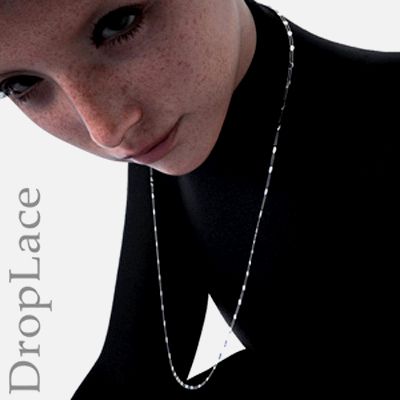
Droplace offers you the ability to simulate a necklace in action through free positioning, morphs, and dForce. Whether on models leaning forward, swaying in the wind, or sliding over fingers—with Droplace, you can achieve what is not possible with conventional 3D necklaces.
DropLace is a simple 2D object that is transformed into a classic-elegant, yet extremely flexible necklace through various texture maps and dForce simulation. DropLace can be used with any Genesis version and any gender.
IMPORTANT: Always turn the simulation option " Start Bones From Memorized Pose " OFF!
Since dropables are not combined (parented) with the model, there is no uniform motion sequence during simulation.
A mini tutorial/infotorial provides you with tips and tricks. Please copy and paste the follwing URL to your browser's address bar.
www.renderhub.com/forum/13860/daz-about-dforce-drapeables-and-dropables
What's included:
* the 2D DropLace object (is installed in the Prop folder)
* 4 different material presets (silver, gold, jade and ruby)
* 4 "Before Simulation Morphs"
* 2 "After Simulation Morphs"
Installation: manual
Path: Props -> Pushee-Ri -> DropLace
………………………………………………………………‥
EULA - End User License Agreement
………………………………………………………………‥
"DropLace", Copyright (c) by Pushee-Ri 2025. All Rights reserved.
By purchasing the "DropLace" package by Pushee-Ri you agree to the following terms of use:
1) This Product is provided "as is" without waranty of any kind.
2) You are allowed to share, distribute or sell the following products created by using "DropLace":
Pictures, Illustrations, Graphic Novels, Videos and Games. If you would like to support my work, you can
mention the product name and / or the author.
3) You are NOT ALLOWED to share, distribute or sell the "DropLace" package in whole or parts of it.
This is not a merchant ressource
Pushee-Ri, September 2025
………………………………………………………………‥
FILES
………………………………………………………………‥
/data/Pushee-Ri/DropLace/DropLace/DropLace.dsf
/data/Pushee-Ri/DropLace/DropLace/Morphs/Pushee-Ri/Base/Bottom Bend.dsf
/data/Pushee-Ri/DropLace/DropLace/Morphs/Pushee-Ri/Base/Bottom Distort.dsf
/data/Pushee-Ri/DropLace/DropLace/Morphs/Pushee-Ri/Base/Bottom Left.dsf
/data/Pushee-Ri/DropLace/DropLace/Morphs/Pushee-Ri/Base/Bottom Longer.dsf
/data/Pushee-Ri/DropLace/DropLace/Morphs/Pushee-Ri/Base/Bottom Right.dsf
/data/Pushee-Ri/DropLace/DropLace/Morphs/Pushee-Ri/Base/Bottom Short.dsf
/data/Pushee-Ri/DropLace/DropLace/Morphs/Pushee-Ri/Base/Bottom Shrink More.dsf
/data/Pushee-Ri/DropLace/DropLace/Morphs/Pushee-Ri/Base/Bottom Shrink.dsf
/data/Pushee-Ri/DropLace/DropLace/Morphs/Pushee-Ri/Base/Rotate Bottom.dsf
/data/Pushee-Ri/DropLace/DropLace/Morphs/Pushee-Ri/Base/Rotate Left.dsf
/data/Pushee-Ri/DropLace/DropLace/Morphs/Pushee-Ri/Base/Rotate Neck.dsf
/data/Pushee-Ri/DropLace/DropLace/Morphs/Pushee-Ri/Base/Rotate Right.dsf
/data/Pushee-Ri/DropLace/DropLace/UV Sets/Pushee-Ri/Base/default.dsf
/Documentation/Pushee-Ri/Dropables/DropLace/psr-droplace-readme.txt
/Documentation/Pushee-Ri/Dropables/DropLace/psr-readme.txt
/Props/Pushee-Ri/DropLace/DropLace.duf
/Props/Pushee-Ri/DropLace/DropLace.duf.png
/Props/Pushee-Ri/DropLace/Quick Info.dsa
/Props/Pushee-Ri/DropLace/Quick Info.png
/Props/Pushee-Ri/DropLace/Materials/Iray/Gold.duf
/Props/Pushee-Ri/DropLace/Materials/Iray/Gold.duf.png
/Props/Pushee-Ri/DropLace/Materials/Iray/Jade.duf
/Props/Pushee-Ri/DropLace/Materials/Iray/Jade.duf.png
/Props/Pushee-Ri/DropLace/Materials/Iray/Ruby.duf
/Props/Pushee-Ri/DropLace/Materials/Iray/Ruby.duf.png
/Props/Pushee-Ri/DropLace/Materials/Iray/Silver.duf
/Props/Pushee-Ri/DropLace/Materials/Iray/Silver.duf.png
/Props/Pushee-Ri/DropLace/Support/Support.dsa
/Props/Pushee-Ri/DropLace/Support/Support.png
/Runtime/Textures/Pushee-Ri/Droplace/psr-droplace-base.jpg
/Runtime/Textures/Pushee-Ri/Droplace/psr-droplace-bump.jpg
/Runtime/Textures/Pushee-Ri/Droplace/psr-droplace-cut.jpg
/Runtime/Textures/Pushee-Ri/Droplace/psr-droplace-gloss.jpg