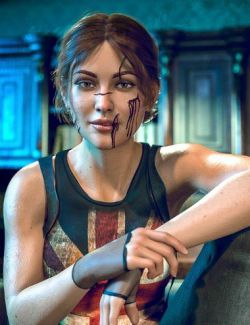
GBJ Nis for Genesis 8/8.1 Male
What's included:
- head and body morphs (separately, without bending corrective morphs) apply / remove
- hair (rigged)
- beard
- eyebrows
- eyelashes
- eyeball shadow
- tear wearable for Genesis 8 figure (for more natural eyes)
Materials:
- 2 skin material presets (human and demon versions). Works with Genesis 8 Male navel and nipple morphs / geografts
- 2 male genitalia material presets (human and demon versions, applied to genesis 8 male anatomical elements)
- 3 eyes material presets (default human and 2 demon versions)
- mouth material preset
Character presets:
- 5 character presets (with 5 different outfits) for each genesis
- wearable presets for each outfit
Clothes (Corvid cloak)
- boots (left and right separately)
- cloak (prop, rigged)
- gloves (left and right separately)
- pants
- shoulder pad
- skirt
- top
Clothes (Covert leathers)
- boots (left and right separately)
- chains (props)
- chest dagger (prop, can be used as a weapon)
- cloak
- dagger in boot (prop, can be used as a weapon)
- dagger in cloak (prop)
- gloves (left and right separately)
- bottom outfit
- top outfit
- pants
- raven emblems (props)
- demon wings (prop, rigged) + basic poses
- additional material presets for each part of the outfit (human/demon versions)
Clothes (Rook camp)
- accessories (props)
- belt
- boots (left and right separately)
- pants
- top
Clothes (The invitation)
- belt accessories (props, left and right separately)
- belt pouch (prop)
- belt
- boots (left and right separately)
- gloves (left and right separately)
- knee bandage + tail (prop)
- knee pads (left and right separately)
- necklace (prop, partially)
- pants
- skirt
- top
All props are parented to figure and can be moved for adjustments after posing.
IMPORTANT! Clothes do not support dForce and complex posing, it may require extra adjustments and smoothing.
Nipples, underwear, expressions and environment elements used in promo pictures are NOT included.
Requirements: Genesis 8 Starter Essentials and Genesis 8 Male anatomical elements (for using genitalia textures).
Installation:
Unpack the .zip archive and paste three (data, People, Runtime) folders in your content library.
Where to find in your library:
(your content library)\People\Genesis 8 Male\Characters\GBJett\GBJ Nis for G8M
----
If you have any issues with my products, do not hesitate to contact me. I'll try to fix everything as soon as possible. :)