************************************************************
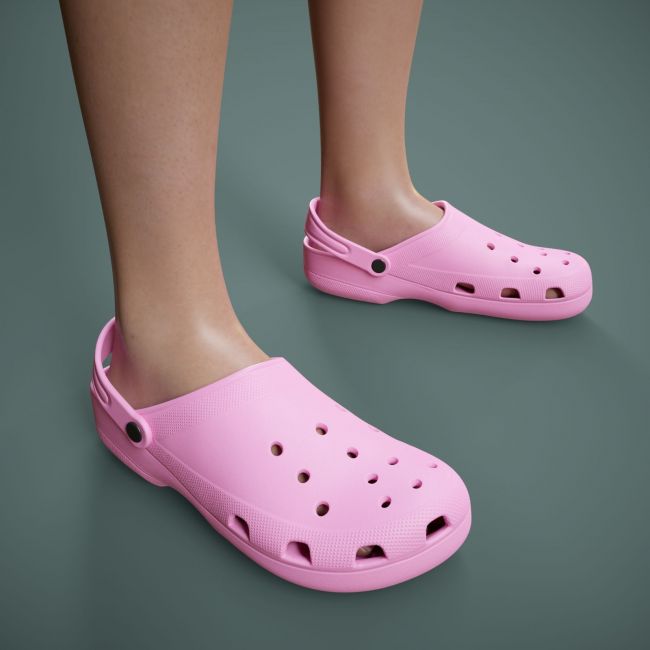
Foam Clogs for Genesis 9
06/2026
YuriBarinov
If necessary, you can contact me via private messages on the Renderosity website.
************************************************************
-------------------------------------------------------------------------------
THE PRODUCT CONTAINS:
- Foam Clogs for Genesis 9
\People\Genesis 9\Clothing\YuriBarinov\FoamClogs
- FoamClogs_G9_Closed.duf
- FoamClogs_G9_Open.duf
\People\Genesis 9\Clothing\YuriBarinov\FoamClogs\Iray Materials
- M_Clogs_Black.duf (material)
- M_Clogs_Blue.duf (material)
- M_Clogs_Pink.duf (material)
- M_Clogs_Red.duf (material)
- M_Clogs_White.duf (material)
- M_Clogs_Yellow.duf (material)
\Runtime\Textures\YuriBarinov\Clogs
- T_ClogsBlack_BaseColor.png (textures)
- T_ClogsB_BaseColor.png (textures)
- T_ClogsP_BaseColor.png (textures)
- T_ClogsR_BaseColor.png (textures)
- T_ClogsW_BaseColor.png (textures)
- T_ClogsY_BaseColor.png (textures)
- T_Clogs_Metalness.png (textures)
- T_Clogs_Normal.png (textures)
- T_Clogs_Roughness.png (textures)
TEXTURES (4096 x 4096 .png):
- Set textures PBR (_BaseColor, _Metallic, _Normal, _Roughness)
COLOR VARIATIONS:
The archive contains 6 color variations of the textures. All of them are presented in the preview.
If necessary, you can easily change the color of the model by changing it in the textures _BaseColor or apply a shade to the _BaseColor texture in the DAZ program settings.
INSTALLATION INSTRUCTIONS:
- Download the Genesis 9 avatar and upload model to the scene.
- Apply the desired color of the material.
Creative success to you!
-------------------------------------------------------------------------------
SYSTEM REQUIREMENTS:
Daz Studio v4
-------------------------------------------------------------------------------
This is a stand alone item, complete unto itself
-------------------------------------------------------------------------------
Thank you for purchasing.
Compatible figures: Genesis 9
Software: Daz Studio 4