Load Here: load figures and props where you want them (free script)
Point your view at a spot, press one button, and everything you load lands there: people standing on it, props sitting on it the way they were built, facing the way you chose.
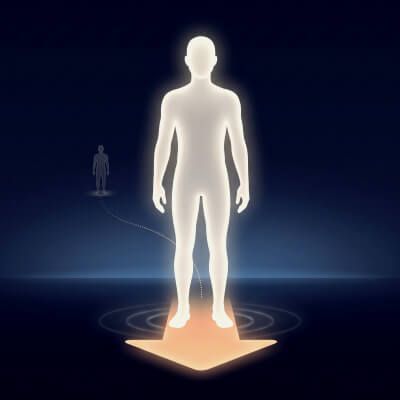
Load Here is a free Daz Script that ends the trip back from the middle of the world (something I've personally struggled with when loading assets into a scene). Look at a spot in your scene (the floor, a table top, a step, a bed), press Load Here ON-OFF, and an orange arrow appears there, facing you. From then on, every figure, prop and scene subset you load from the Content Library lands on that arrow instead of at the origin (Daz puts everything you load at 0, 0, 0, the middle of the world, and in a big scene that is rarely where you are working), facing the way it points. Big scenes stop being a hunt for the thing you just loaded.
It places things the way you would by hand (or at least that is how it has worked for me in the last couple of weeks). People stand on the arrow by their feet. Props meet it the way their maker built them to meet the ground, wherever their pivot is: a tree keeps its roots below the floor, a pool its sunken basin, while a cup saved on a table in its product's scene is set down. Scene subsets move and turn as one group, so the lamp stays on its table. Smart props don't get stuck to the arrow, and clothing and hair follow their figure as always. Every landing is one undo step.
Aim Drop Point moves the arrow to whatever is in the middle of your view, also through scene cameras: on top of a table, on the floor in front of a wall or a cabinet, on an HDRI's ground. Bring here moves what you have selected to the arrow at any time, with automatic mode on or off. The arrow never renders and is saved with your scene, so you can test renders on the fly without having to worry about it.
No window, nothing running in the background: three one-click scripts, and a Menu buttons script that puts them in Daz's Scripts menu for toolbar buttons or hotkeys. I tried to make it as simple as I could in the last week of working on it and testing it myself.
Daz Studio 4.24 and Daz Studio 6 Load Here works the same in both. There is one difference under the hood: when you aim at a wall, Load Here looks at the floor in front of it, and Daz 4.24 can't tell a script which way each point of the view looks, so in 4.24 Load Here works that out from the camera's lens. In my tests, aiming at the same walls in both versions, the arrow landed within a few millimetres of the same spot.
Tip for both: aiming at the floor or a table top puts the arrow exactly where you look. Aiming at a wall lets Load Here pick the nearest clear spot in front of it (in front of the desk, not under it, also on a raised floor or a rug).
What you get Four scripts (Load Here ON-OFF, Aim Drop Point, Bring here, Menu buttons) and a README that explains every button and the 4.24 difference. Copy the Load Here folder into the Scripts folder of any content library and double-click in the Content Library.
Compatibility Daz Studio 4.24 and Daz Studio 6. Made and tested on Windows. Any figure and any prop: tested with Genesis 9 and Genesis 8 figures and +100 props from over 30 products. This should work with previous Genesis figures and basically anything that is loaded into a scene. If you have issues please let me know!
Free tool. Share it freely. It may not be sold, resold, bundled into a paid product or put behind a paywall.
PS. I used it in Daz 6 and Daz 4.24. I have been having issues with Daz 4.24 as it leaks a lot of memory, but surprisingly in the hours and hours of testing and usage I didn't have any issues with it causing crashes. Not saying it is crash safe, but if you find any issues, bugs or even have any suggestions, please let me know!