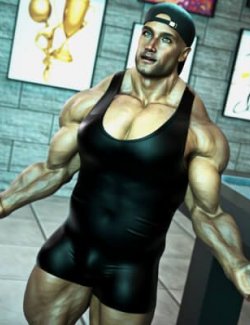
Fitting Morph/ Dedicated Morph
Dedicated Fits - PRO Fitness Jumpsuit 2 - AEL Xeya/Xelphy allows you to use our 'https://www.renderhub.com/kaos3d/pro-fitness-jumpsuit-2-for-genesis-9' with 'https://www.renderhub.com/amouretluxure's' 'https://www.renderhub.com/amouretluxure/xeya-xelphys-clone-for-g9'.
There is 1 custom morph and 4 different textures in this mini update
This morph has a unique name to prevent any duplicate formula call out.
How to use this product:
1) Load Genesis 9 into Daz Studio/ Premier 4.24.0.4. or higher.
2) Apply 'https://www.renderhub.com/amouretluxure' 'https://www.renderhub.com/amouretluxure/xeya-xelphys-clone-for-g9' to Genesis 9.
3) Now load in the clothing from our 'https://www.renderhub.com/kaos3d/pro-fitness-jumpsuit-2-for-genesis-9' in the usual way.
Simply extract the contents of my zip into any mapped directory that Daz Studio has access to. Make sure to restart Daz Studio, so that it can add the new data to it's database. Then you are good to go.
This product has been thoroughly tested this in Daz Studio/ Premier 4.24.0.4.
Please note: There are no figures, character morphs, skin textures, hair, eyelashes, clothing or environmental elements in this product. My product promos are for reference purposes only. To give you an idea of how these clothing fitting morphs will look when rendered.
Required Product(s):
https://www.renderhub.com/amouretluxure/xeya-xelphys-clone-for-g9 by https://www.renderhub.com/amouretluxure .
Genesis 9
Resources Used:
Skin: https://www.renderhub.com/amouretluxure/xelphys-skin-care-makeover-for-g9 by https://www.renderhub.com/amouretluxure .
If you are in need of fitting morphs for this outfit or any other clothing or 3rd party products for any of my characters… just send me a site message and I'll add it to the list.