LAUNCH SPECIAL: 30% OFF FOR A LIMITED TIME!
Get the complete low-RAM environment suite for just $6.96 (Reg. $9.95). Price returns to standard retail soon!
Retro Hangout - One-Click Environment & Light Setup
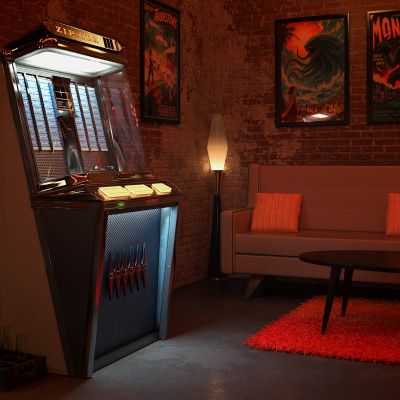
Bring your characters to life instantly with Retro Hangout, a premium 2D/3D hybrid environment solution designed exclusively for Daz Studio and NVIDIA Iray.
Stop wasting hours configuring complex render settings, positioning cameras, and tweaking stubborn lights. With Retro Hangout, the entire setup is complete with just a single double-click. Your backdrop, HDRI environment map, custom-colored ghost lights, shadow catcher and camera angle load perfectly synced and ready to go.
Whether you are rendering a solo character portrait, a complex group interaction, or props this scene delivers gorgeous, high-fidelity depth with lightning-fast render times.
[ 100% Daz Studio Created Asset — Zero AI Generated Elements ]
________________________________________
The One-Click Workflow
When you load the Retro Hangout Scene Preset, Daz Studio automatically handles the heavy lifting:
• Instant Environment Backdrop: Places the optimized 2D backdrop directly into your Environment pane.
• Synced HDRI Mapping: Automatically loads the matching custom HDRI map for ambient lighting into your Render Settings Environment Map for environmental illumination.
• Dual Custom Ghost Lights: Spawns two custom-colored ghost lights perfectly positioned to cast realistic, cinematic color pooling onto your characters.
• Perfect Camera Angle: Drops in a pre-configured camera dialed into the absolute sweet spot for the composition.
• Optional Shadow Catcher: If your character's feet are not touching the ground properly then turn on the Shadow Catcher in the scene tab to add accurate shadows. You can adjust the Shadow Catcher to fit your needs.
________________________________________
Effortless Customization & Setup
• Drag & Render: Just load the scene, drag in your favorite characters or extra props (drag + Alt or Option), move them into the light pool, and hit render!
• Easy Adjustments: The custom ghost lights are fully visible in Texture Shaded Mode, allowing you to easily scale, move, or rotate them to perfectly match your character's height and pose.
• Invisible in Iray: As soon as you switch your viewport or final render to NVIDIA Iray Mode, the ghost lights instantly disappear from view while remaining completely active—giving you perfect lighting without unwanted geometry blocking your shot.
• Highly Flexible: Want a different mood? Simply select the Ghost Lights in your Scene tab and tweak the Luminance or Color settings in the Surfaces pane.
The Extra Touch:
• Designed for 2D Backdrops: This product features a built-in, hidden 3D Shadow Catcher Plane perfectly aligned with the perspective of the 2D background environment.
• Clean Scene Hierarchy: By default, the Shadow Catcher layer is hidden to keep your workspace uncluttered.
• Effortless Placement (Pro-Tip): To avoid your characters spawning miles away at World Zero, do not double-click them! Instead, hold the Alt key (Windows) or Option key (Mac) while dragging your character or prop directly onto the backdrop floor. They will instantly snap to the correct position and scale.
• Instant 3D Realism: Once your character is placed (if it's feet are off the ground), simply unhide (click on the closed eye in the scene tab) the shadow catcher plane to instantly catch realistic, physically accurate 3D shadows—making your assets blend seamlessly into the photo!
________________________________________
What's Included in the Pack
• Retro Hangout - Scene.duf (The main dbl-click scene preset file)
• High-Fidelity 2D Environment Backdrop Texture
• Custom-Matched HDRI Environment Map
• 2 Pre-Configured Custom Colored Ghost Lights
• 1 Pre-Set Composition Camera
• 1 Shadow Catcher Plane
________________________________________
⚙ System Requirements & Compatibility
• Software: Daz Studio 4.x or higher
• Render Engine: NVIDIA Iray
• Supported Figures: Fully compatible with all generations (Genesis 3, 8, 8.1, 9, or custom figures).
________________________________________
Installation Notes
1. Extract the contents of the ZIP folder.
2. Copy the Content folder structure directly into your main Daz Studio Content Directory (e.g., /Documents/DAZ 3D/Studio/My Library/).
3. Merge folders if prompted.
4. Locate the product inside Daz Studio under: Content Library -> Environments -> Retro Hangout.