Vertex Snap Pro is a convenient DAZ Studio utility for accurately aligning two mesh objects.
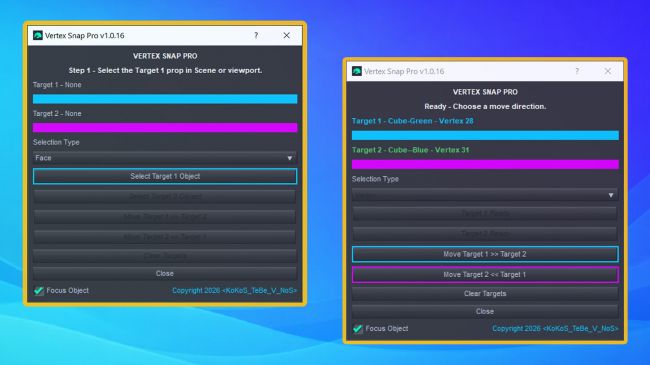
Select two objects, choose Vertex, Edge, or Face mode, and select one vertex, edge, or face on each object. After pressing the command, the script automatically aligns the selected components in world space.
No more endless manual dragging or guessing whether the objects are perfectly aligned - select, click, and done. Less clicking, more creating, and fewer reasons to argue with the viewport :)
Vertex Snap Pro is useful for architecture, interiors, furniture, props, modular models, and any scene where accurate positioning matters.
Main features:
- Vertex, Edge, and Face alignment;
- automatic Geometry Editor activation;
- selectable movement direction;
- switching between Target 1 and Target 2;
- optional focus on the active target;
- Clear Targets command;
- proper DAZ Studio Undo support;
- restoration of the previous viewport tool;
- no additional dependencies required.
Requires DAZ Studio 4.x or DAZ Studio 6.x. Tested with DAZ Studio 4.24 on Windows.
Video: https://youtu.be/HVO9uGR3gwI
Software: Daz Studio 4, Daz Studio 6