PRODUCT NAME:
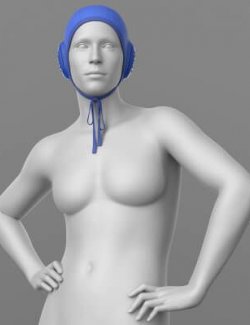
Water Polo Cap
THE PRODUCT CONTAINS:
- Water Polo Cap for Genesis 8 Male
ARCHIVE CONTAINS FORMATS:
- Water_Polo_Cap.duf (model Cap)
- Knot.duf (model Knot)
- WP_Water_Polo_Cap.duf (model Cap+Knot)
- Water_Polo_Cap_.duf (material 13 options)
- PNG (textures)
TEXTURES (4096 x 4096 .png):
- Set textures PBR (_AO, _BaseColor, _Height, _Metallic, _Normal, _Roughness, _Mask, _Opacity)
COLOR VARIATIONS:
The archive contains 13 options variations of the textures. All of them are presented in the preview.
- Black
- White
- Blue
- Red
- Green
- Black/Whate
- Blue/Whate
- Red/Whate
- Green/Whate
- Whate/Black
- Blue/Black
- Red/Black
- Green/Black
If necessary, you can easily change the color of the model by changing it in the textures _BaseColor or apply a shade to the _BaseColor texture in the DAZ program settings.
INSTRUCTION MANUAL:
- Download the Genesis 8 avatar and upload model to the scene.
- Apply the desired color of the material.
- The dForce settings for the Cap and for the Knot are different, so for the simulation to work correctly, it is necessary to apply the appropriate saved materials to the elements.
Creative success to you!
NOTE :
- dForce is configured for the model, this will allow you to apply the model in any pose.
- Added 4 Mask Textures:
MASK_CAP
MASK_EARS
MASK_KANT
MASK_NO_EARS
This will allow you to adjust the color of only individual elements. The textures are located in the folder \Runtime\Textures\Elena_Shvets\Water_Polo_Cap
- If you want to make the ear pads non-transparent, simply disable the Opacity texture in the material settings.
THANK YOU FOR YOUR PURCHASE!