************************************************************
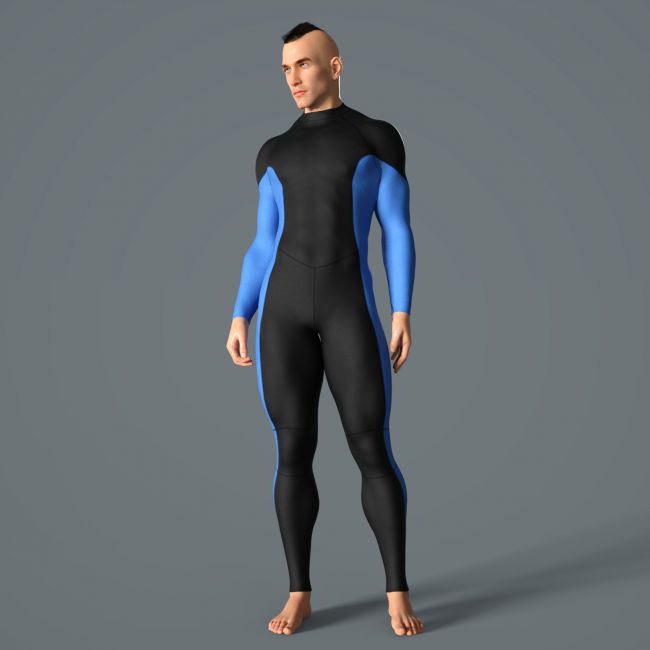
Wetsuit
09/2026
ElenaShvets
If necessary, you can contact me via private messages on the Renderosity website.
************************************************************
-------------------------------------------------------------------------------
THE PRODUCT CONTAINS:
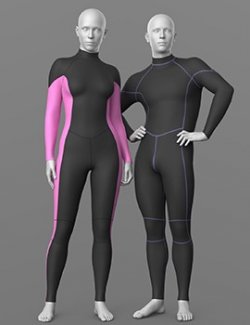
- Wetsuit for Genesis 8M
ARCHIVE CONTAINS FORMATS:
\People\Genesis 8 Male\Clothing\Elena_Shvets\Wetsuit
- Wetsuit_G8M.duf
- Tape_G8M.duf
- WP_Wetsuit_G8M.duf
\People\Genesis 8 Male\Clothing\Elena_Shvets\Wetsuit\Iray Materials
- Tape_MAT.duf (material)
- Wetsuit_BLACK.duf (material)
- Wetsuit_BLACK_RED.duf (material)
- Wetsuit_BLACK_VIOLET.duf (material)
- Wetsuit_BLACK_WHITE.duf (material)
- Wetsuit_BLUE.duf (material)
- Wetsuit_PINK.duf (material)
- Wetsuit_RED.duf (material)
- Wetsuit_TURQUOISE.duf (material)
- Wetsuit_WHITE.duf (material)
- Wetsuit_YELLOW.duf (material)
\Runtime\Textures\Elena_Shvets\Wetsuit
- Wetsuit_AO.png (textures)
- Wetsuit_BaseColor_BLACK.png (textures)
- Wetsuit_BaseColor_BLACK_RED.png (textures)
- Wetsuit_BaseColor_BLACK_VIOLET.png (textures)
- Wetsuit_BaseColor_BLACK_WHITE.png (textures)
- Wetsuit_BaseColor_BLUE.png (textures)
- Wetsuit_BaseColor_PINK.png (textures)
- Wetsuit_BaseColor_RED.png (textures)
- Wetsuit_BaseColor_Turquoise.png (textures)
- Wetsuit_BaseColor_WHITE.png (textures)
- Wetsuit_BaseColor_YELLOW.png (textures)
- Wetsuit_Height.png (textures)
- Wetsuit_Metallic.png (textures)
- Wetsuit_Normal.png (textures)
- Wetsuit_Roughness.png (textures)
TEXTURES (4096 x 4096 .png):
- Set textures PBR (_AO, _BaseColor, _Height, _Metallic, _Normal, _Roughness)
COLOR VARIATIONS:
The archive contains 10 color variations of the textures. All of them are presented in the preview.
- Black
- White
- Blue
- Pink
- Red
- Yellow
- Turquoise
- Black_White
- Black_Red
- Black_Violet
If necessary, you can easily change the color of the model by changing it in the textures _BaseColor or apply a shade to the _BaseColor texture in the DAZ program settings.
INSTALLATION INSTRUCTIONS:
- Download the Genesis 8 avatar and upload model to the scene.
- The Tape model has different dForce settings than the suit. You must use the appropriate material.
- Apply the desired color of the material.
Creative success to you!
NOTE:
- dForce is configured for the model, this will allow you to apply the model in any pose.
-------------------------------------------------------------------------------
SYSTEM REQUIREMENTS:
Daz Studio v4
-------------------------------------------------------------------------------
This is a stand alone item, complete unto itself
-------------------------------------------------------------------------------
THANK YOU FOR YOUR PURCHASE!
Compatible figures: Genesis 8 Male
Software: Daz Studio 4