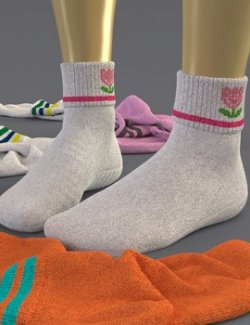
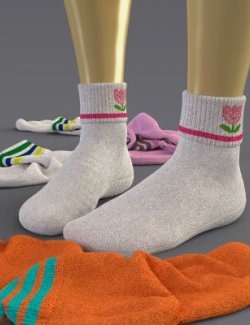
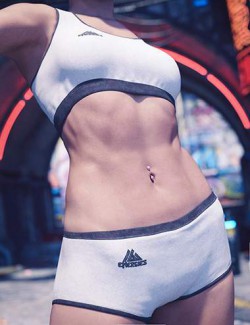
Requires: EliteDZ – Vans No-Show Socks for G8F.
Upgrade your Vans No-Show Socks with this brand-new Under Armour Add-on, bringing a sporty twist and extra customization options to your renders. Designed for Genesis 8 Female, this pack adds variety, realism, and creative control, perfect for casual, gym, or lifestyle scenes.
Includes 2 Texture versions:
Textures V1:
2 Base Textures: Black and White
Each color includes 3 dirt stages – Clean, Light Dirt, and Extreme Dirt – for realistic wear variations.
Textures V1:
LIE Edition (Layered Image Editor):
Take full control over your look with the LIE-based version, offering:
✔ Customizable sock color
✔ Customizable secondary accent color
✔ Customizable logo color
✔ Optional Sand Pebble dirt layer, compatible with both Under Armour and Vans socks
Bring that premium athletic vibe to your scene — mix, match, and fine-tune your look with ease.
Installation:
Extract the ZIP file into your Daz3D library folder.
Load the Mat from:
My Library\People\Genesis 8 Female\Clothing\EliteDZ\EliteDZ_SocksVans\Under Armour 1
My Library\People\Genesis 8 Female\Clothing\EliteDZ\EliteDZ_SocksVans\Under Armour 2
How to Use:
You'll find two folders:
1. Under Armour 1
This contains the regular dirt (like the Vans) in two colors: white and black.
2. Under Armour 2
This folder contains four subfolders that should be applied in order:
✔Colors Clean – choose the base sock color (no logo).
✔Second Color – choose the second color as an overlay. You can also adjust it in the Surfaces tab if you want a specific shade.
Note: when you reach step 2 where Daz3D L.I.E. is used, if you pick a color and don't like it, don't select a new one right after. Instead, press Ctrl+Z to undo, otherwise the texture quality will decrease.
✔Logo Color – choose the logo color. This uses the Daz3D L.I.E. method, where Daz creates a new file, prints the logo on it, and stores it in the temp folder. You can create as many textures as you like and save them elsewhere.
✔SandPebble – add the final touch to the socks. As usual, follow the numbering: first apply the displacement, then the texture itself.
✅ Created and tested in Daz Studio version 4.23.0.1
Need help?
✉ Message me if you encounter any issues with the product.
Disclaimer: This fan-made content is inspired by Under Armour visuals and branding, but is not officially associated with or endorsed by Under Armour.