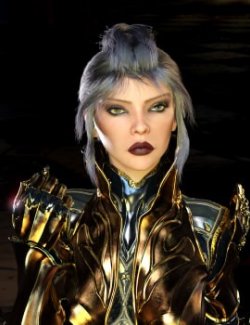
The DeathBringer Set
By Zakiel29 January 2026
---
Please read carefully, as this is an extensive Readme:
---
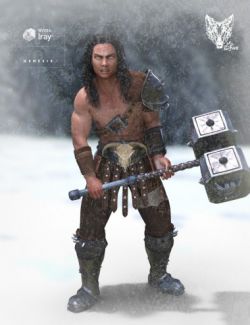
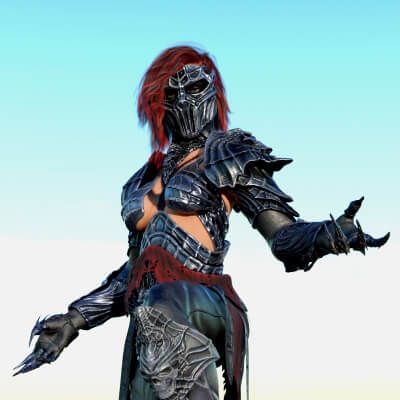
I am proud to present this set, which—honestly—gave me quite a few headaches during development! However, I did my best to ensure it is as easy to use, versatile, and functional as possible. This set is designed to complement "The Vampiric Throne" and other upcoming products. Without further ado, let's look at the content:
⚙ This Product Includes:
/// Props:
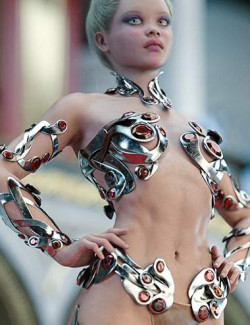
1) Armored Bra: A piece of armor designed for female bodies. It wasn't part of the original concept but was added during production as an aesthetic piece to provide chest coverage.
--- Compatible Materials: Metals.
2) Leggings: Designed as an alternative to baggy pants for female figures, highlighting their form.
--- Compatible Materials: Leathers.
Note: It has a DForce modifier working as static surface.
3) Arms: A single prop that includes both right and left arms. Each arm can be hidden individually using the included utility materials.
--- Compatible Materials: Metal and Leather.
--- Morphs (Parameters/Morphs - Shaping Tab): Finger-Tips-Long; Forearm-Spike-In-Out.
4) Boots: A single prop including both right and left boots.
--- Compatible Materials: Metal.
--- Morphs (Parameters/Morphs - Shaping Tab): Boots-Armor_Expand-All; Knee-Sides_Expand; Knee-Spike; Knee-UpperBorder_Expand; Knee_Scale.
5) Mask: Attaches to the Head bone of Genesis 9.
--- Compatible Materials: Metal.
--- Morphs (Parameters/Morphs - Shaping Tab): Adjust-AroundEyes; Adjust-Cheeks; Adjust-Chin; Adjust-Forehead; Adjust-Yaw.
6) Neck Armor: * Compatible Materials: Metal.
7)Pants (dForce): Baggy pants suitable for both male and female versions. These were the only leg option in the original design before I added the leggings.
--- Compatible Materials: Leathers.
--- Morphs (Parameters/Morphs - Shaping Tab): Abdomen-Adjust_Front; Abdomen-Adjust_Sides; Abdomen-Adjust_UpperBorder; Belt-Abdomen-UpperSkirt-Expand; Corrective-Pants_KneeSides-01; Corrective-Pants_KneeSides-02; Corrective-Pants_Legs-01; LowerBack-Adjust; Pants-Inflate; Pants-Inflate-02; Waist-Width.
8-9) Shoulders (Left/Right): The shoulders are separate figures with their own bones to provide maximum control during animation or complex posing. As metal pieces that are highly visible, I didn't want them to deform awkwardly when posing the character.
Usage Tip: In reality, these pieces usually pivot from the trapezius and are held by leather straps. For this fantasy set, I chose to omit the straps while maintaining realistic behavior. When equipped, the shoulders are parented to the Right/Left Upper Arm.
Posing: To pose them, double-click to select the shoulder FIGURE (not the bone) in the viewport to access the custom Posing parameters. While they follow the arm movements, these custom parameters grant you total freedom. You can also use the Universal Tool to pose them manually.
--- Compatible Materials: Metal.
--- Morphs (Parameters/Posing - Posing Tab): (With the shoulder FIGURE selected): Bend-Up-Down; Front-Back; Move-Front-Back; Move-In-Out; Move-Up-Down; Scale-Height; Scale-Length; Scale-Uniform; Scale-Width; Translate Along Arm; Twist.
10) Skirt-Belt (dForce): The skirt is designed so that dForce only affects the cloth and leather; the metal belt remains unaffected by the simulation.
--- Compatible Materials: Metal and Fabric.
--- Morphs (Parameters/Morphs - Shaping Tab): Adjust-Abdomen; Adjust-Abdomen-Sides; Adjust-Abdomen-Upper; Adjust-Lower-Back; Expand_Belt-Abdomen-UpperSkirt; Expand_LeatherStripes-02; Full-Skirt-Stripes_Expand; Full-Skirt-Wind-1; Waist-Width; Skirt-Upper_Expand; Stripe-Back-01-L-Bend_Tip-1; Stripe-Back-01-R-Bend_Tip-1; Stripe-Back-02-L-Bend-1; Stripe-Back-02-R-Bend-1; Stripe-Back-L-Bend-1; Stripe-Back-R-Bend-1; Stripe-Front-L-Bend-1; Stripe-Front-R-Bend-1; Stripes_Expand-All; Stripes-ALL-Expand; Stripe-Side-01-R-Bend-1; Stripe-Side-L-Bend-1.
11) Tank-Top (dForce): This piece was also added later. It provides basic chest coverage for female characters, and although the Armored Bra almost replaced it, I decided to include it as an extra option that also looks great on male characters.
--- Compatible Materials: Fabric.
--- Morphs (Parameters/Morphs - Shaping Tab): Adjust-Abdomen; Adjust-Abdomen-Upper; Adjust-Lower-Back; Waist-Width; Expand.
⚙ Compatible Bodies:
I have tested this product with a wide range of bodies, including: 3DA Lark, Ally 9, Amala, Amelia 9, Angela 9, Death 9, Death 9 Toned, Freja 9, Hanako 9, Jennie 9 (Curvy/Lean/Thin), Joan 9, Josie 9, Julia 9, Kala 9, Kara 9 (Heavy/Buff), Karmen 9, Valenia 9, Ivar 9, Zack 9, Ty, Thomas 9, and more.
IRAY Materials:
Full Sets (Hierarchical Materials): To use these, select your Genesis 9 figure first. These presets allow for a quick application of metals, leathers, or fabrics to all equipped items at once. Includes:
--- 12 Metals | 10 Leather colors | 10 Fabric colors.
- Metals (12): Can be applied independently to each compatible prop. (e.g., Black Mask, Red Arms, Silver Legs).
- Leathers (10): Can be applied independently to each compatible prop. (e.g., Red Leather Pants, Black Leather Arms).
- Fabrics (10): Can be applied independently to each compatible prop. (e.g., Red Skirt, Black Tank-Top).
- Utility (Hide/Show Parts): These materials are designed to hide or show specific parts of a prop or hide them entirely. Included:
Hide/Show Left-Right Shoulder; Hide/Show Left-Right Arm; Hide/Show Left-Right Arm Leather; Hide/Show Pants; Hide/Show Leather Stripes.