Shalla Bal based on the Marvel Comics character.
CHARACTER:
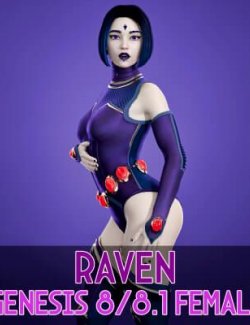
- Raven for Genesis 8 and 8.1 as separated scene subsets
> Morphs Applied
> Makeup 03 Applied
> Equipped With Hair
> Equipped With Eyebrows
MORPHS:
- Raven Body and Head Morphs apply and remove preset
> Morphs: DUM Shalla Bal Head / DUM Shalla Bal Body
MATERIALS:
- Apply Skin
> Makeup 03 Applied
> Metallic Flakes Enable
> Materials/Colors
> 10 Color Variations (Can be easily edit so the results can be any color you want)
> Apply Colors FIRST
- Materials/Glossiness
> Enable / Disable Metallic Flakes (To see changes on Glossiness)
> 4 Levels of Glossiness
- Materials/Makeup
> 9 Makeup options (Makeup 00 = to no Makeup)
HAIR:
- Shalla Bal Hair
> Short Hair, no bones.
> Autofit for Shalla Bal Head
- Hair/Color
> 10 Color Variations (Matching Skin and Board)
- Hair/Glossiness
> Enable / Disable Metallic Flakes (To see changes on Glossiness)
> 4 Levels of Glossiness
- Shalla Bal Surfboard
> Simple Prop
- Surfboard/Color
> 10 Color Variations (Matching Skin and Hair)
- Surfboard/Glossiness
> Enable / Disable Metallic Flakes (To see changes on Glossiness)
> 4 Levels of Glossiness
IMPORTANT: The appearance of this character is highly sensitive to lighting, HDRI settings, and other environmental factors. Using a single-color light source or a solid-color HDRI may result in a flat or even 'invisible' look, as the uniform lighting reflects a single color across the surface. Please keep this in mind and feel free to experiment with different lighting setups to achieve the best results.
Everything comes with high quality custom textures to enhance your renders.
Install directory:
People/Genesis 8 Female/Characters/Dumitas/Shalla Bal/
The file comes ready to install using Install Manager to make it easy to uninstall or change location, you can also install in manually using free tools such as 7-Zip. (Install Manager Guide : https://www.renderhub.com/forum/4129/daz-how-to-use-install-manager-dim)
If you notice any errors or have any suggestions, feel free to send me a direct message. I'm always available to respond and will do my best to address any issues. Thank you for your input!