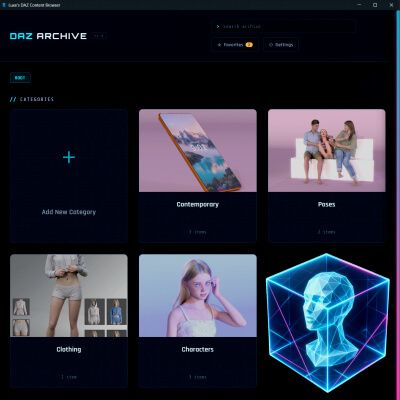
A desktop app for organizing and deploying a DAZ 3D content library that has outgrown its folders.
Point it at your content directories and it builds a visual catalog on its own. Every product appears as a card with its preview images and packaged archives, arranged by the category structure you already have on disk. You do not have to tag anything to get started. When you want to, you can add your own tags and star favorites so the shortcuts you actually use sit on top of the library you already own.
I use it every day. I never liked living with bloated DAZ folders, and Luxe is obsessed with keeping her libraries in order. That is why my better half made this for me. It grew from a house tool into something we feel ready to share with the community.
What you can do with it:
1. Browse and search the whole library. Drill into categories, or filter by name, until the thing you remember is actually in front of you.
2. Export selected content straight into a Studio library folder. Tick the items on their cards, choose a destination, and the app copies them there.
3. Keep track of installs. The app remembers what is already installed, and where, so taking it back out is just as easy as putting it in.
4. Catch packages that do not follow DAZ Studio's expected layout. It flags zip, rar, and 7z files that unpack into a mess, then repacks them into a clean structure in one click, with the original set safely aside.
5. Stay on your machine. No cloud account, no upload. Just a friendly face on the folders you already own.
It is for the person with thousands of DAZ purchases scattered across drives who wants to find things again, and move them where they need to go, without digging through nested zip files by hand.
For support, please visit: https://www.renderhub.com/forum/10865/luxe-muse-support-and-updates