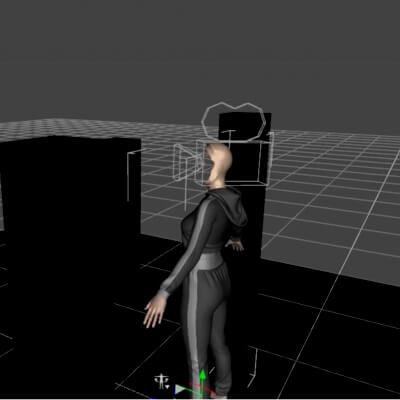
See your renders through your character's eyes, in one click. POV One Click drops a camera exactly at your figure's eye level, parents it to the head so it follows every pose and every frame of animation, and hides only what blocks the view. One more click puts everything back.
Perfect for: First-person storytelling, animated POV walk-throughs, horror and exploration scenes, game-style previews, and "what the character sees" shots.
WHAT IT DOES
Make POV: Select the character and double-click the script: a "POV - " camera is created at the eyes and set as your active view. No manual parenting, no keyframes.
Head-locked tracking: The camera rides the head, so it follows the gaze through any pose and across the whole animation timeline. See the product video: a full animated walk with zero camera keyframes.
Smart head hiding: Hides only that character's face, hair, lashes, brows, hats and glasses. Hands, arms and body stay in shot, and every other character stays visible.
Restore POV: Returns visibility exactly as it was, drops you back to Perspective view, and offers to delete the POV camera. Works after saving and reloading, and Edit > Undo is supported too.
WHY NOT JUST A CAMERA PRESET?
Unlike single-figure eye cameras, POV One Click covers three Genesis generations (8, 8.1 and 9, female and male), hides the blocking head parts for you, cleans up after itself, and ships under a commercial-friendly license.
WHAT'S INCLUDED
Make POV and Restore POV scripts, plus a full readme with install steps (DAZ Install Manager or manual), menu/toolbar custom-action setup, and known limitations.
COMPATIBILITY
Genesis 8,
Genesis 8.1
Genesis 9 (female and male).
USE CASES
Animated first-person walk-throughs and chase scenes
Horror, mystery and exploration POV shots
Game-style and VR-style scene previews
Character-driven storytelling renders and visual novel angles
LICENSE
Extended Use License — usable for both non-commercial and commercial renders, illustrations, and publications. See full 3D Content Licensing Agreement for terms.
EXPAND YOUR WORLD (Related Assets)
Japanese Neighbourhood Block — walk the cherry-blossom streets in first person: https://www.renderhub.com/pulsehavenstudios/japanese-neighbourhood-block...
Neon Gamer Room — sit at the battlestation through your character's eyes.