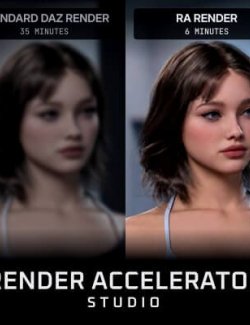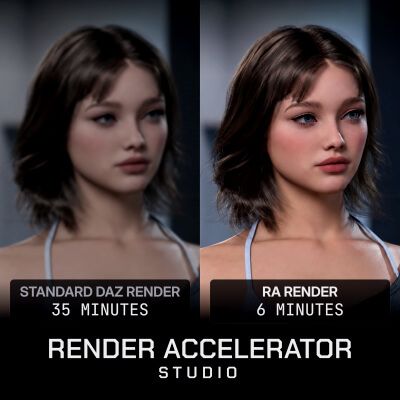
Render Accelerator Studio is designed to accelerate your DAZ Studio Iray renders by approximately 2-4x, while preserving the original appearance and visual quality of your scene.
RA does not work like a traditional AI image enhancer and does not invent details that were never present in your render. Instead, it works directly with your DAZ Studio rendering workflow to reduce render times, manage GPU resources, and produce the final result significantly faster.
---------
FOUR TECHNOLOGIES IN ONE APPLICATION
---------
RENDER ACCELERATION:
- RA uses a specially trained model together with a custom-calibrated denoising system to significantly reduce Iray render times.
- Balanced / Medium is calibrated to reach approximately the same visual quality as a traditional DAZ Studio render in the shortest possible time.
- Higher Effort levels allow RA to spend more time processing the render, producing higher-quality results with more visible detail than a traditional DAZ Studio render, while still completing significantly faster.
NVIDIA NTC:
- NVIDIA's Neural Texture Compression technology is integrated into the RA workflow to help reduce VRAM usage in heavy scenes.
- If a scene exceeds your available VRAM, NTC can automatically optimize compatible textures while preserving their visual appearance.
- This can allow scenes that would otherwise exceed your GPU memory to render without manually reducing texture quality.
VRAM CLEANUP:
- DAZ Studio can retain unnecessary VRAM after working with multiple scenes or renders.
- RA can automatically clean up this unused VRAM before rendering, reducing the need to restart DAZ Studio simply to recover GPU memory.
ADVANCED RENDER QUEUE:
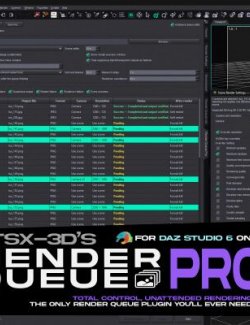
RA includes a built-in Render Queue system for batch rendering multiple scenes.
You can:
- Queue multiple scenes
- Select different cameras
- Adjust render settings
- Change scene-specific settings without manually reopening every scene in DAZ Studio
- Use RA's acceleration and VRAM features across queued renders
----------
RENDER MODES
----------
Balanced: Designed to provide the best combination of render speed and visual quality.
Ultra: Coming soon.
----------
EFFORT LEVELS
----------
Medium: Optimized to reach traditional DAZ Studio render quality as quickly as possible.
High: Allows additional processing time for improved detail and image quality.
Max: Uses RA's highest processing level for the best available result. Render times are longer than Medium, but still significantly shorter than a traditional DAZ Studio render in most cases.
------------
EASY DAZ STUDIO INTEGRATION
------------
When Render Accelerator Studio is launched for the first time, it automatically detects your DAZ Studio installation and guides you through installing the required plugin.
Once connected, RA can automatically detect your currently opened DAZ Studio scene and available cameras.
Your scene remains a DAZ Studio / Iray render - RA simply manages and accelerates the rendering process.
-----
IMPORTANT - DAZ STUDIO 4.24
-----
This version of Render Accelerator Studio currently supports DAZ Studio 4.24 only.
Support for DAZ Studio 6 will be added in future updates.
-----
EXTENSIONS
-----
Render Accelerator Studio supports optional extensions that add additional rendering features.
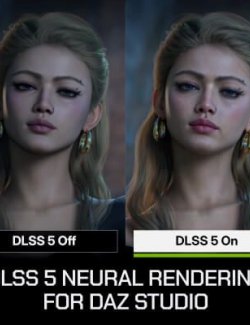
Extensions such as DLSS 5 Neural Rendering can be purchased separately and installed directly through the Extensions section inside RA Studio.
RA Studio is required to use RA Studio extensions.
----
ABOUT ANTIVIRUS DETECTION
----
Some antivirus programs may flag one of RA Studio's files as potentially harmful.
RA needs to communicate with DAZ Studio in the background and, when necessary, interact with its running process to control the render. Antivirus software can occasionally classify this type of behavior as suspicious because similar techniques may also be used by malicious applications.
This has been reported as a false positive to multiple antivirus vendors, including Microsoft Defender.
------------
SUPPORT & BUG REPORTS
------------
If you encounter a problem, open Settings -> Report a Problem inside Render Accelerator Studio. The application will generate a diagnostic ZIP containing the information needed to investigate the issue. You can send it through the RA Studio Discord community for support.
-
LICENSE DELIVERY
-
After purchasing Render Accelerator Studio, your personal activation key will be sent to you via RenderHub DM as soon as your purchase is confirmed. You do not need to contact me or request a key manually. An internet connection is required for license verification and for using Render Accelerator Studio.