Bucket with Handel
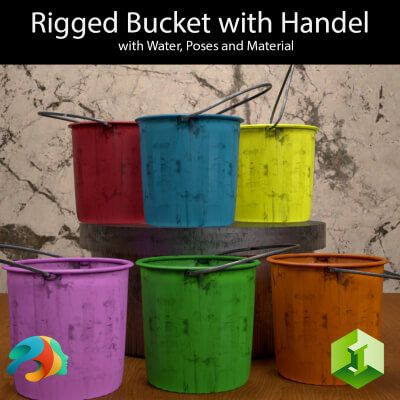
Add a touch of everyday realism to your renders with this versatile, standalone Bucket with Handel asset. Whether your characters are tackling intense spring cleaning, washing the car, or working on a gritty outdoor scene, this asset delivers the perfect utility look.
Because this asset is set up as a true Figure, the handle is fully rigged with its own bone structure, allowing you to position it naturally or use the included presets. Best of all, it is completely standalone and not bound to any specific Genesis generation, making it a universal tool for your Daz Studio library.
To make your chores or cleaning scenes truly authentic, a custom Water Plane is included and pre-configured!
What's Included:
Based on the library files, you will find everything neatly organized into its respective folders:
Main Figures & Props:
Bucket with Handel.duf (The standalone rigged figure)
Bucket with Handel and Water.duf (Pre-loaded with the water plane)
Water Plane.duf (Separate water prop for maximum flexibility)
Material Presets (6 Grungy, Worn Color Variations):
Blue.duf
Default Orange.duf
Green.duf
Pink.duf
Red.duf
Yellow.duf
Pose Presets (4 Handle Positions):
Default Pose.duf
Pose 01.duf
Pose 02.duf
Pose 03.duf
How to Install (Unzip Instructions)
Download the ZIP file to your computer.
Right-click the ZIP file and select Extract All… (Windows) or double-click it (Mac). You can also use free software like 7-Zip or WinRAR.
Choose a destination folder to extract the files.
Open the extracted folder, look for the My Library folder, and copy its entire contents (Props, Runtime, etc.).
Paste these files directly into your primary Daz 3D content directory (usually located at Documents/DAZ 3D/Studio/My Library).
Refresh your Content Library in Daz Studio, and you are ready to render!