Art Official Intelligence: DAZ Studio-Centred Workflows with AI Tools
AI is changing the creative landscape — but where does that leave the DAZ Studio artist?
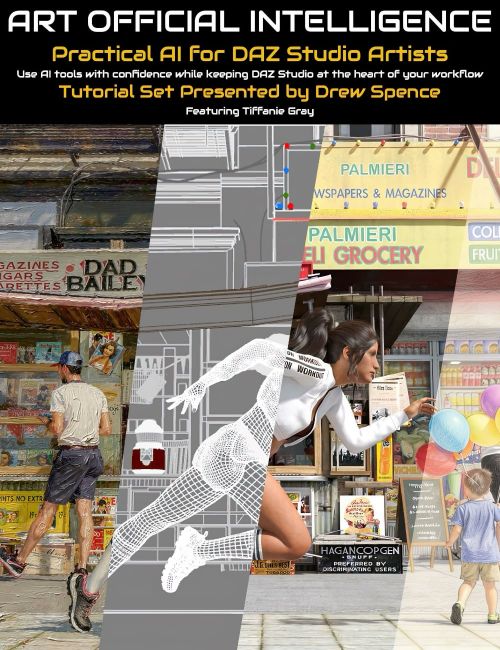
Art Official Intelligence is a practical 4-part training series presented by Drew Spence, created for DAZ Studio users who want to explore modern AI-assisted workflows while keeping DAZ Studio at the heart of the creative process.
This product is not about replacing your artwork with prompts or shortcuts. It is about learning how AI can support your existing skills in scene creation, storytelling, composition, mood, effects, and post-work enhancement.
Drew Spence brings a unique perspective as a comic creator and long-time DAZ Studio artist, combining CGI illustration, photorealistic image work, and narrative production into an artist-first approach.
What You Will Learn
Session 1 — Leading the AI
Create your scene in DAZ Studio first, then use AI tools for lighting shifts, atmosphere, polish, mood changes, and finishing touches.
Session 2 — Running Parallel with AI
Use AI alongside DAZ Studio to generate supporting assets such as effects, backgrounds, scene extensions, and custom visual elements.
Session 3 — Being Led by AI
Learn how AI images can act as references for stronger composition, lighting, scale, camera choices, and storytelling ideas — then recreate and improve those ideas inside DAZ Studio.
Session 4 — AI as Workstation
Combine techniques into a modern hybrid workflow for faster experimentation, more creative options, and stronger finished results.
Why This Product Matters
- Keep DAZ Studio central in the AI era
- Learn practical workflows instead of hype
- Improve renders with lighting, mood, and polish tools
- Solve creative bottlenecks like crowds, effects, and backgrounds
- Use AI as an assistant — not the artist
- Gain insight from a professional visual storyteller
Included in This Product
- 4 live class recordings with real-time teaching, discussion, and demonstrations
- 4 polished pre-recorded companion sessions for clear step-by-step learning
- Bonus behind-the-scenes videos for each session where Drew explores the DAZ Studio scenes, lighting, setups, and creative decisions used in the course
- Practical examples and commentary throughout
- Artist-first guidance for hybrid creation
- Workflow ideas you can apply immediately
Who It’s For
- Existing DAZ Studio users
- Comic creators and visual storytellers
- Artists curious about AI but cautious about authorship
- Creators wanting to stay relevant while protecting artistic identity
AI is here. The question is: who leads — you, or the machine?
What's Included and Features
-
Art Official Intelligence Tutorial Set Tutorial Product Name
- 4 live class recordings with real-time teaching, discussion, and demonstrations
- 4 polished pre-recorded companion sessions for clear step-by-step learning
- Bonus behind-the-scenes videos for each session where Drew explores the DAZ Studio scenes, lighting, setups, and creative decisions used in the course
-
Final Session 01 Part I Woman on Beach Adobe Firefly Photoshop : 13 minutes (.MP4)
- 00:00 Course intro: AI + DAZ workflow for intermediate users; focus is combining tools, not learning prompting.
- 04:00 Demonstration begins: import DAZ render into Adobe Firefly and Photoshop to start AI-based postwork and style changes.
- 08:00 Uses generative fill to fix issues, extend the image, and enhance composition while keeping the original DAZ concept intact.
- 12:00 Applies stylistic changes (watercolor, lighting, mood) showing AI as a finishing tool—artist leads, AI enhances.
-
Final Session 01 Part II Elderly Couple on Bench Adobe Photoshop : 17 minutes (.MP4)
- 00:00 Continues “Leading the AI”: import DAZ scene (elderly couple) and use AI tools to separate subject and background for better focus control.
- 04:00 Applies subtle artistic adjustments (blur, saturation, depth of field) emphasizing that AI replaces tools, not artistic judgment.
- 08:00 Demonstrates layering and blending AI styles (painterly, pencil) while controlling intensity through opacity and manual refinement.
- 12:00 Adds new elements (pigeons) using AI to enhance storytelling—final message: artist creates first, AI enhances second.
-
Final Session 02 Part I Mechanic Takes a Break Adobe Photoshop : 16 minutes (.MP4)
- 00:00 Session 2 begins: AI works in parallel with DAZ—used to fix issues and add content to an existing render (garage scene example).
- 04:00 Uses generative fill to populate empty shelves with realistic props, showing AI can save significant scene-building time.
- 08:00 Emphasises artist responsibility: fix AI artifacts manually and apply the “Three C’s” (care, control, consistency).
- 12:00 Applies tonal adjustments (color, lighting, subject isolation) and subtle enhancements—AI assists, but artist controls final look.
- 16:00 Closing idea: AI adds efficiency and detail, but strong results come from subtlety and maintaining DAZ as the creative foundation.
-
Final Session 02 Part II Wizard and the Dragon : 1 hour 19 minutes (.MP4)
- 00:00 Session continues: AI used in parallel to generate effects (fire, energy, debris) to enhance a DAZ “wizard vs dragon” scene.
- 04:00 Workflow setup: duplicate base image, remove DAZ placeholders, prepare clean scene for compositing AI-generated effects.
- 08:00 Uses multiple AI tools (Midjourney, Cling, Firefly) simultaneously to generate fireballs and flame assets on black backgrounds.
- 12:00 Emphasises building a reusable asset library (naming, folders, prompts) rather than generating one-off images.
- 16:00 Generates varied flame streams and effects; highlights importance of having multiple options to choose the best result.
- 20:00 Discusses consistency: generating similar variations helps maintain continuity across scenes or sequences.
- 24:00 Creates electrical energy effects for the wizard, again using multiple engines and saving prompts for reuse.
- 28:00 Generates large energy fields and wave effects to escalate the scene beyond simple hand-level effects.
- 32:00 Creates background skies using AI; notes background importance depends on its visual prominence in composition.
- 36:00 Compares different sky options and selects based on composition needs (contrast, silhouette, mood).
- 40:00 Begins Photoshop compositing: places sky, scales, and adjusts to support main focal elements.
- 44:00 Imports fireball effects; uses blend modes (Screen) to remove black backgrounds and integrate into scene.
- 48:00 Adds flame streams and particles; manually adjusts placement, distortion, and opacity for realism.
- 52:00 Uses levels and cleanup techniques to remove artifacts and refine edges—artist control remains essential.
- 56:00 Builds up layered effects around dragon mouth; experiments with duplication and variation for stronger visuals.
- 01:00:00 Shifts focus to wizard: adds energy effects and adjusts opacity to balance power between characters.
- 01:04:00 Enhances central brightness using Photoshop techniques (duplicated layers, selective erasing) rather than AI.
- 01:08:00 Addresses storytelling detail (wizard’s hat): manually edits, repositions, and integrates with effects.
- 01:12:00 Demonstrates manual fixes where AI struggles (fine detail, object separation, precision edits).
- 01:16:00 Adds particles/debris effects to enhance motion and impact; uses multiply/screen blending depending on background.
- 01:20:00 Final adjustments: refine composition, control intensity, and ensure effects support—not overpower—the scene.
- 01:24:00 Closing takeaway: AI generates assets, but artistic decisions—placement, subtlety, storytelling—remain human-led.
-
Final Session 03 Woman on Beach Led by AI : 1 hour 3 minutes (.MP4)
- 00:00 AI is used as a reference tool, not output—reverse-engineering prompts from a DAZ render to guide artistic improvement.
- 04:00 AI-generated prompt is analysed into parts: artist intent (“me”), DAZ execution, and descriptive embellishment.
- 08:00 Prompt fed into AI engines to generate variations; goal is inspiration, not replication.
- 12:00 Reviews outputs to extract ideas (composition, clothing flow, background elements) that were not originally considered.
- 16:00 Notes moderation limits and need to adjust prompts; keeps process flexible rather than overly precise.
- 20:00 Identifies key improvements: more dynamic clothing, better composition, stronger environment (water vs sand ratio).
- 24:00 Returns to DAZ Studio, rebuilding scene with more control using modular assets inspired by AI outputs.
- 28:00 Adjusts composition (wider aspect ratio, horizon placement, framing) to match stronger AI-inspired layouts.
- 32:00 Refines character details: pose, facial expression, clothing length, and realism (e.g., wet clothing effects).
- 36:00 Swaps assets (e.g., better shirt model) to match visual goals rather than forcing original choices.
- 40:00 Experiments with hair and styling, ensuring consistency with environment (wind, moisture, realism).
- 44:00 Evaluates background simplicity—removes unnecessary elements like clouds if they weaken composition.
- 48:00 Introduces HDRI lighting for mood (sunset tones) to replace flat lighting and create emotional impact.
- 52:00 Adds controlled lighting (rim/face light) to enhance subject visibility while keeping it subtle and natural.
- 56:00 Fine-tunes composition: color harmony, reflections (e.g., mirrored glasses), and balance between subject and background.
- 01:00:00 Moves to Photoshop for final polish: reflections, framing, and subtle vignette to focus attention.
- 01:04:00 Final adjustments to contrast, tone, and sharpness; emphasises stepping away and
-
Final Session 04 AI Workstation FREEPIK : 37 minutes (.MP4)
- 00:00 Session 4 introduces AI as a workstation, combining multiple tools (generation, editing, upscaling, variation) into one workflow.
- 04:00 Demonstrates camera change tool—shifting from head-on to side view to instantly alter composition and storytelling.
- 08:00 Uses resize/extend to adjust aspect ratio, showing how AI can quickly reframe images without returning to DAZ.
- 12:00 Applies restyle (e.g., watercolor) to explore different artistic looks while maintaining original composition.
- 16:00 Experiments with adding people via inpainting; highlights rapid iteration and low-cost experimentation.
- 20:00 Realisation: not all additions improve the image—AI enables testing ideas quickly, then discarding them without sunk cost.
- 24:00 Adds distant sailboat for balance—small compositional elements can enhance focus without distraction.
- 28:00 Uses restyle variations and background removal; builds multiple versions while keeping creative flexibility.
- 32:00 Generates multiple camera-angle variations (grid of shots) to support storytelling and increase visual variety.
- 36:00 Final workflow: combine AI-generated assets, DAZ renders, and Photoshop into a unified pipeline—artist remains the creative driver.
-
Art Official Intelligence Session 1a (Live Class Recording) : 60 minutes
- 00:00 Introduces course scope, disclaimers, and AI as a tool to enhance creative workflows.
- 00:04 Covers AI history: deep learning, GPUs, and emergence of large language models.
- 00:08 Explains AI as probabilistic pattern prediction rather than true intelligence.
- 00:12 Human vs AI test shows humans use context while AI relies on repetition.
- 00:16 Emphasises AI lacks understanding and requires human judgment.
- 00:20 Discusses data scraping, fair use, and ethical/legal concerns.
- 00:24 Explores open vs closed models (DAZ-owned vs Adobe licensed datasets).
- 00:28 Introduces the “30% rule”—AI assists, humans retain creative control.
- 00:32 Reinforces that prompting alone cannot replace artistic skill.
- 00:36 Explains AI hallucinations and need for artist correction.
- 00:40 Defines workflows: human-led, AI-assisted, and hybrid approaches.
- 00:44 Shows pre-AI workflows using Photoshop filters and actions.
- 00:48 Demonstrates legacy tools (Redfield, PhotoSketcher) for stylisation.
- 00:52 Explores painterly rendering tools like Dynamic Auto Painter.
- 00:56 Covers traditional adjustments (colour, tone, lighting, overlays).
- 01:00 Introduces Adobe Firefly and cloud-based AI tools for image enhancement.
-
Art Official Intelligence Session 1b (Live Class Recording) : 52 minutes
- 00:00 Q&A on AI rights: ownership depends on platform; paid tools usually allow commercial use and opt-out of training.
- 00:04 Clarifies copyright: AI-assisted work can be owned; fully AI-generated work is more restricted.
- 00:08 Discussion on presenting AI work—artists should be transparent but maintain ownership identity.
- 00:12 Emphasises internal ethics: decide how much of your work is “you” vs tool-assisted.
- 00:16 Argues AI is similar to past tools (filters, plugins); ethical concerns are often inconsistent.
- 00:20 Audience vs peers: peers care about process; audiences care about whether they like the result.
- 00:24 Highlights perception bias—AI work judged differently even when visually superior.
- 00:28 Reinforces artistic identity: art must reflect the creator, not just generated outputs.
- 00:32 Warns against over-reliance on AI—creative fulfillment comes from making, not outsourcing.
- 00:36 Demonstrates enhanced DAZ render: adds rain, fog, reflections using AI generative tools.
- 00:40 Shows AI solving complex problems (crowds/people) that are difficult in DAZ alone.
- 00:44 Compares AI crowds vs manual methods (low poly, compositing)—same goal, different efficiency.
- 00:48 Discusses challenge vs ease: artists must push themselves to avoid creative stagnation.
- 00:52 Applies style changes (watercolour, film noir), reinforcing AI as enhancement—not replacement.
-
Art Official Intelligence Session 2 (Live Class Recording) : 1 hour 55 minutes
- 00:00 Introduces session focus: using AI alongside DAZ Studio workflows to enhance productivity.
- 00:04 Explains working “in parallel” with AI instead of only post-processing after renders.
- 00:08 Introduces the “Three C’s” of art: Care, Control, Consistency.
- 00:12 Emphasises control—artists must take responsibility for all aspects of their work.
- 00:16 Highlights consistency in output quality as a mark of artistic mastery.
- 00:20 Reviews DAZ-specific issues: lighting, poke-through, posing, expressions.
- 00:24 Connects same issues to AI: anatomy errors, perspective flaws, inconsistencies.
- 00:28 Stresses importance of checking details—AI does not remove need for editing.
- 00:32 Discusses portfolio discipline: only show best work, not all outputs.
- 00:36 Introduces role of critique/editing (e.g., Tiffany) to refine final work.
- 00:40 Shows AI-enhanced render flaws (text errors, artifacts, inconsistencies).
- 00:44 Reinforces need for manual correction even when AI output looks impressive.
- 00:48 Reviews homework: analysing older work to identify improvements.
- 00:52 New exercise: analyse best work for strengths and personal artistic identity.
- 00:56 Begins Frankenstein example—simplifying DAZ scene in preparation for AI enhancement.
- 01:00 Explains planning renders with AI in mind (leaving space for effects).
- 01:04 Audience suggests effects (lightning, energy, electricity).
- 01:08 Demonstrates generating lightning assets using AI tools.
- 01:12 Builds asset library (lightning, particles, sparks) instead of one-off outputs.
- 01:16 Introduces concept: AI as asset generator, not just image generator.
- 01:20 Generates additional effects (sparks, smoke, particles) across platforms.
- 01:24 Imports assets into Photoshop and applies blending modes.
- 01:28 Shows layering lightning effects onto DAZ render for composition.
- 01:32 Demonstrates iterative experimentation—testing multiple overlays.
- 01:36 Adjusts composition to maintain subject focus and readability.
- 01:40 Adds vertical energy effects and refines placement.
- 01:44 Uses overlays for colour grading and tonal shifts.
- 01:48 Combines multiple effects into cohesive final Frankenstein artwork.
- 01:52 Reinforces workflow: DAZ base + AI assets + manual control.
- 01:55 Concludes: AI accelerates workflow and expands possibilities, but artistic judgment, control, and decision-making remain entirely human.
-
Art Official Intelligence Session 3 (Live Class Recording) : 1 hour 37 minutes
- 00:00 Introduces Session 3: letting AI lead the workflow, then rebuilding ideas in DAZ.
- 00:04 Recaps previous sessions: DAZ first, then parallel AI asset generation.
- 00:08 Introduces “More and Again” as a creative and artistic driver.
- 00:12 Connects artistic success with people wanting more of your work.
- 00:16 Reframes fame and fortune as audience reach and creative freedom.
- 00:20 Identifies inspiration as the force that keeps artists creating.
- 00:24 Discusses inspiration from films, DAZ products, and other artwork.
- 00:28 Shows how DAZ products can teach new techniques and workflows.
- 00:32 Highlights DAZ’s strength in consistency compared with AI.
- 00:36 Presents cyberpunk biker DAZ render as the starting image.
- 00:40 Uses AI to reverse-engineer a prompt from the DAZ render.
- 00:44 Sends the prompt into AI tools to generate alternative versions.
- 00:48 Reviews AI outputs for ideas: lighting, blur, reflections, camera angles.
- 00:52 Identifies improvements to bring back into DAZ manually.
- 00:56 Shrinks distracting bike luggage to improve the composition.
- 01:00 Adds puddle reflections by extracting a DAZ prop from another product.
- 01:04 Opens the sky and changes camera angle for stronger drama.
- 01:08 Kitbashes the bike front using unrelated DAZ props.
- 01:12 Adds glowing wheel details using kitbash parts and emissive surfaces.
- 01:16 Uses ghost lights to improve character lighting and scene cohesion.
- 01:20 Replaces billboards with personal/custom artwork to add meaning.
- 01:24 Compares original render with the more AI-inspired DAZ rebuild.
- 01:28 Demonstrates using DAZ-rendered skies as reusable background assets.
- 01:32 Adds postwork: flares, bloom, rain, motion blur, and water splashes.
- 01:36 Shows billboard-heavy city examples and explains AI as inspiration, not replacement.
- 01:37 Wrap-up: homework is to compare old and best work, then use AI-inspired techniques to bridge the gap.
-
Art Official Intelligence Session 4 (Live Class Recording) : 1 hour 28 minutes
- 00:00 Introduces “AI as a workstation”—using AI to expand creative thinking beyond personal limits.
- 00:04 Explains limits of imagination—ideas must exist before they can be created.
- 00:08 Compares creativity to collaboration (like a band)—AI adds external input.
- 00:12 Describes AI as a “puzzle piece generator” filling gaps in ideas.
- 00:16 Positions AI as a tool to break out of personal creative constraints.
- 00:20 Frames AI as collaborator (art director, writer, creative partner).
- 00:24 Introduces workstation mindset—AI tools as a unified creative environment.
- 00:28 Reviews tools (edit, retouch, resize, restyle) mirroring Photoshop workflows.
- 00:32 Reinforces familiarity—AI tools extend existing techniques.
- 00:36 Introduces “3 C’s”: Care, Control, Consistency in artistic output.
- 00:40 Demonstrates critical review—checking details, text, and coherence.
- 00:44 Uses inpainting to replace billboard content with better-fitting imagery.
- 00:48 Iterates results—selects strongest output from multiple generations.
- 00:52 Expands scene—adds billboard and improves composition balance.
- 00:56 Refines output—removes artifacts and experiments with variations.
- 01:00 Uses resize tool to extend frame and recover reflections.
- 01:04 Adds background characters to increase scene depth.
- 01:08 Applies style changes (e.g., watercolor) to explore variation.
- 01:12 Emphasises freedom to experiment due to low cost of failure.
- 01:16 Warns against rushing—best results come from exploring ideas fully.
- 01:20 Introduces relight tool to adjust lighting direction and mood.
- 01:24 Compares relit vs original—AI enhances mood but may lose detail.
- 01:28 Final takeaway: AI acts as a creative workstation that expands ideas and speed, but the artist must retain control, judgment, and identity.
-
Final Bonus 01A Woman on the Beach Daz Studio Session : 22 minutes
- 00:00 Introduces behind-the-scenes DAZ workflow: building a neutral base scene for later AI enhancement.
- 00:04 Selects clothing (shirt + bikini) balancing realism vs intention—“ballpark, not perfection.”
- 00:08 Builds pose and motion (running on beach), adjusting hair and accessories for flexibility.
- 00:12 Sets camera and composition; identifies lighting issues (blown-out sky, lost detail).
- 00:16 Experiments with HDRI lighting; rejects stylised looks to aim for neutral baseline.
- 00:20 Achieves balanced lighting and composition—clean, neutral render ready for AI workflows.
- 00:22 Concludes: goal is a flexible DAZ base image that can be expanded and enhanced using AI tools later.
-
Final Bonus 01C Elderly Couple on Bench Daz Studio Session : 21 minutes
- 00:00 Introduces scene setup (elderly couple on bench) and importance of tracking character generations for consistency.
- 00:04 Positions characters carefully—avoids intersections and ensures scene works from multiple camera angles.
- 00:08 Builds scene detail (bag, props, birds), adapting assets creatively (e.g. repurposing textures).
- 00:12 Refines expressions and poses—balances realism vs exaggerated “comic” style.
- 00:16 Adjusts composition, lighting, and materials (shoes, shadows) to avoid distractions and improve cohesion.
- 00:20 Finalises neutral lighting, materials, and camera—clean base render ready for further workflow.
- 00:21 Concludes: focus is on a solid, flexible DAZ foundation that can support later AI or postwork enhancements.
-
Final Bonus 02 The Mechanic Takes a Break Daz Session: 11 minutes
- 00:00 Introduces “Mechanic Takes a Break” scene—building a simple, neutral DAZ setup with a known outcome in mind.
- 00:04 Refines pose, intersections, and expression—aims for subtle, semi-neutral character rather than exaggerated emotion.
- 00:08 Adjusts lighting using external light sets—moves toward a neutral, controlled base scene with clear composition.
- 00:11 Concludes: establishes a clean, minimal DAZ foundation (lighting, space, character) ready for later enhancement and experimentation.
-
Final Bonus 02 Bonus 02 The Wizard and the Dragon Daz Studio Session : 19 minutes
- 00:00 Introduces wizard vs dragon scene—building a simple DAZ setup focused on demonstrating techniques rather than final art.
- 00:04 Selects costume and accessories—balances visual storytelling with practical scene needs.
- 00:08 Blocks scene composition (wizard vs dragon positioning) and refines pose to avoid weakness/cowering.
- 00:12 Adjusts environment and camera—prioritises clarity and strong silhouette over complexity.
- 00:16 Builds lighting manually using emissive objects—creates controllable, dramatic but flexible setup.
- 00:19 Concludes: establishes a strong, semi-neutral foundation (composition + lighting) ready for further enhancement in AI/postwork.
-
Final Bonus 04 Bodega Run Daz Studio Session : 10 minutes
- 00:00 Introduces “Bodega Run” scene—building a dynamic character with outfit, hair, and running pose for a strong base.
- 00:04 Refines pose and hands to convey speed and natural movement rather than action/combat energy.
- 00:08 Builds environment using kitbashing (storefront, props) and balances composition so character remains the focal point.
- 00:10 Concludes: achieves a clean, flat-lit, well-composed DAZ render ready for AI editing and further enhancement.
Install Types:
DazCentral, Daz Connect, DIM, Manual Install