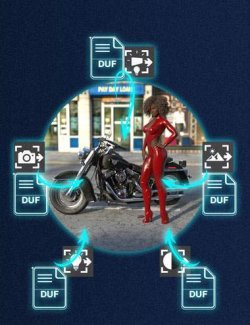
Find exactly what you need in any .duf and import only that into your scene.
Scene Master opens any DAZ Studio scene file (.duf) and shows you its contents organized by type: props, wearables, poses, cameras, lights, materials and render settings. Pick what you want and bring only those pieces into the scene you are working on. No loading time for the stuff you don't need.
- What it solves
You have hundreds of saved scenes, asset bundles and render setups scattered across your library.
But every time you need a single prop, a specific pose or a set of materials from one of them, opening that file loads the entire scene-all the figures, all the assets, everything.
Scene Master lets you open the file, see what is inside (grouped and labeled), and import only the pieces you actually want.
It is the smart way to assemble complex scenes from saved files without the clutter of full merges.
- Features
. Smart categories: Items grouped by type (Props & Assets, Wearables, Poses, Cameras, Lights, Materials, Render Settings).
. Non-modal panel: Keep working in your scene while Scene Master is open. Select a figure or surface to apply a pose, wearable or material to.
. Wearable Fit: When you import a wearable (dress, hair, accessory), it conforms to the figure you have selected. The list shows which figure each piece was originally fit to.
. Material tracking: The list tells you which item (prop, figure, wearable) each material surface belongs to, so you know what you are getting.
. Render settings à la carte: The Tonemapper, Environment and global Render Settings come as separate items so you can import just the one you want.
. Single or batch: Select one item or tick "Multiple" to pick several at once.
. Selection counter: Know exactly how many items you are about to import.
- Use Cases
. Scene builder iterating fast. You are assembling a complex scene from multiple saved setups. Instead of opening each file, finding the right prop and copy-pasting it, you use Scene Master to browse and grab pieces from several files in sequence. No reloading, no clutter.
. Material hunting. You need a specific material surface from a saved render. Instead of opening the whole scene and trying to extract just that material, Scene Master lists every surface by name and shows you which item it belongs to. Click and import.
.Pose library surgery. You saved a pose on Genesis 8 Figure A, but you want to apply it to Genesis 8 Figure B in your current scene. Open the original file, pick the pose, select Figure B, and Scene Master applies the pose to the right figure.
.Wearable mixing. You want to combine clothing from three different character saves into one. Each piece was saved as a wearable preset fitted to its original figure, but Scene Master can Fit each piece to your target figure as it imports.
. Render settings cloning. You saved a lighting and render setup in one file. Instead of opening that file and hunting down which settings to copy, Scene Master lists the render items separately. Take the Environment you like and leave the rest.
. Selective merging. You want to merge a saved scene into your working file, but only the props, not the figures or rigs. With Scene Master you pick exactly which items come over.
- Compatibility
. DAZ Studio 415+ and DAZ Studio 6.x (Tested on DAZ 4.15, 4.21, 4.22, 4.23, 4.24 e 6 )
. Windows, macOS, Linux
. Scope: Imports scene pieces (props, poses, wearables, materials, cameras, lights, render settings).
Changelog
v1.2 (21/06/2026)
DAZ Studio 415+ compatibility
v1.1 (20/06/2026)
- Single instance: no more duplicate windows. (mitigates the chance of the daz crash.)
- Remembers your last opened file.
v1.0 (20/06/2026)
- Initial release.