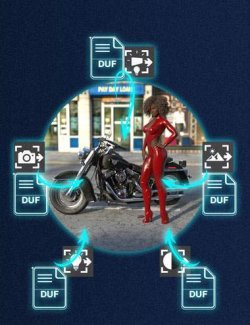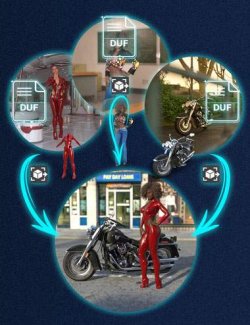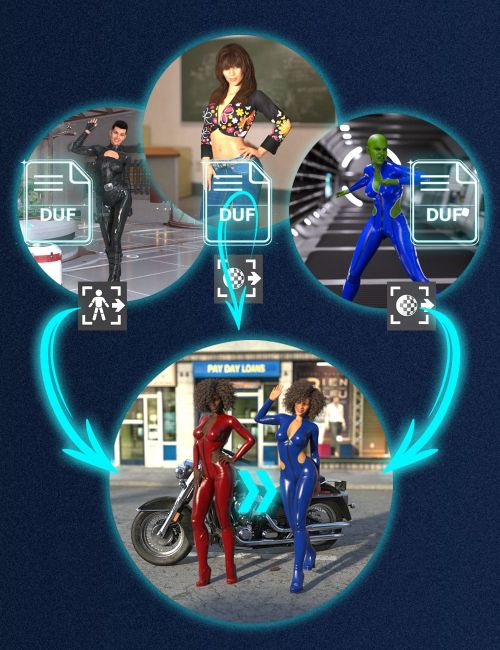
V3D Extract and Append : Poses and Material Properties is a workflow tool designed to recover and apply compatible poses or material properties directly from saved DAZ Studio Scene and Scene Subset files to the figure or prop currently selected in your scene.
Instead of reopening another saved scene just to recover a pose you liked or material properties you carefully adjusted, this product lets you extract and apply only the compatible data you want to reuse on your current figure or prop.
This workflow is not limited to loading data from very different scenes. It is also very practical during normal scene iteration. You may have customized a figure or prop, adjusted many settings, and changed the pose or material properties, then decide that an earlier saved version was better for one specific part of the work. Instead of rebuilding it manually, you can simply reload that earlier pose or those earlier material properties from a previous saved scene while keeping the rest of your current work intact.
Depending on the script you launch, this product lets you recover and apply poses or material properties from compatible saved Scene and Scene Subset files. The selected data is applied directly to the current figure or prop in your scene, without creating a new preset file or writing a new DUF to disk.
This product focuses on reusable pose and surface-property data rather than geometry loading. It is made to apply compatible poses to figures or props already present in your scene, and to reload compatible material properties onto the surfaces of the figure or prop you selected.
The scripts analyze one or more compatible DUF files, list the usable source figures or props they find corresponding to your current selection, and let you decide exactly what to apply. For pose extraction, compatibility is based on the internal figure or prop name. For Genesis figures, male and female figures of the same generation are also grouped to make pose reuse more practical, including Genesis 8 and 8.1 cross-compatibility. For material properties extraction, compatibility is based on matching surface sets, with the same surface names on both sides.
For pose extraction, the selected pose is applied directly to the figure or prop currently selected in your scene. For Genesis figures, a specific option lets you ignore head bones and facial pose controls when needed, so you can choose between reloading the full pose with its expression or keeping the current scene expression while reloading the rest of the pose. Two transform handling modes are available as well. One reloads the pose while preserving the current location of the selected figure or prop, while the other resets its translation to the center of the scene.
For material properties extraction, the script transfers the material properties only, not the shader itself. This helps preserve the shader already present on your figure or prop in the scene. When the source and destination use the same shader type, the result will behave similarly to a full material reload. When the shader types differ, only the properties shared by both shaders are transferred.
An advanced Alt option is also available when launching the material properties extractor. When used, it resets each destination surface to its default values before applying the new source properties, except for tiling and UV set. This can be especially useful when you want a cleaner reload and avoid leftover values or maps from the current material.
UV sets are not transferred automatically. In many common cases this will not cause any issue, but some transfers may still require a manual UV correction afterward. The interface helps with this by displaying a UV Rep column, so you can see which source UV set was used and restore it manually if needed.
A gamma-loading option is also available for material properties. When enabled, the gamma values used by the source images are reapplied together with the image maps. This helps preserve the original look more closely, but it also means that if the same image file is already used elsewhere in the scene, its gamma value may change there too.
For best results, launch the product from a toolbar button or custom action. You can then work from files selected in Content Library or Smart Content, or manually browse to the DUF files you want to use. Non-compatible files, such as Pose Presets or Material Presets, are automatically filtered out, so you can stay focused on compatible scene content.
The tool does not create new assets in your library and does not rebuild content on disk. It reads existing DUF scene data and applies the selected pose or material properties directly to the current figure or prop in your scene. Your original files remain unchanged.
Because the final step is still a normal DAZ Studio property-loading process, standard DAZ Studio behavior may still apply depending on the source content. Pose transfers typically remain quiet when compatible properties exist on both sides. Material transfers may show the usual DAZ Studio prompts if some referenced texture files are missing. In DAZ Studio 6, Smart Content file selection is supported through the Files section, while the Product section currently has selection limitations.
V3D Extract and Append: Poses and Material Properties turns older saved scenes and subsets into practical, reusable sources for your current work. Intuitive, easy to use, and workflow-efficient, it helps you recover the poses and material properties you want without interrupting your scene-building process.
What's Included and Features
- V3D Extract and Append: Poses and Material Properties: (.dse)
- Scripts:
- Open Documentation
- Install Me First
- Material Properties Extract and Append
- Poses Extract and Append
Compatible Software:
Daz Studio 2025 / 6.X, Daz Studio 4.24
Install Types:
DazCentral, Daz Connect, DIM, Manual Install