MAD LIBRARIAN: EVERY DAZ STUDIO PRODUCT YOU OWN, IN ONE WINDOW
Windows 10/11 (64-bit) works with DAZ Studio 4 and DAZ Studio 6
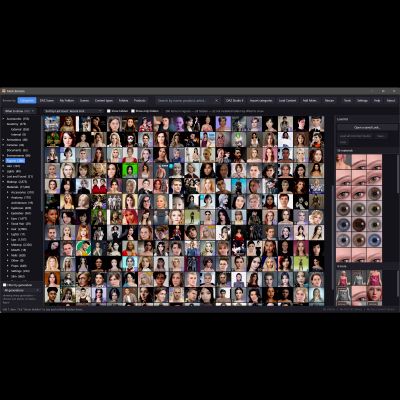
DAZ Studio splits your content in two. Smart Content has the categories, but only for
products that came with metadata. The Content Library has everything, but only as
folders. Anything you unzipped yourself ends up only in the folders: on the library this
was built against, that was 36.8% of everything installed. Mad Librarian puts all of it in
one window, with the category tree over everything, and loads, dresses and paints
straight into the DAZ Studio you have open.
MAKEUP AND GEOGRAFTS THAT CROSS GENERATIONS AND GENDERS
• Put any makeup on any figure: Genesis 9, 8.1, 8, 3 and 2, and back again, female to
male and male to female. The sheet is carried through DAZ's own clone correspondence,
so eyeshadow lands on the eyelids, not the forehead
• Geografts cross too: one made for another generation or the other gender is converted
to fit the figure and colored to match its skin
• The figure keeps her or his own skin tone: only the makeup crosses, never the vendor
character's complexion
• Looks stack: face paint, a lace overlay, eye makeup, lip colour and tattoos from
different products accumulate on one face instead of replacing each other
• Finds makeup however it ships: material presets, layered-image presets, scripts,
shader presets, Poser-era files, hierarchical presets. Script-delivered and encrypted
looks are resolved to their readable parts and applied as one
• Remove this makeup takes one look off and keeps the rest; Remove all makeup puts the
figure's own skin back. Removers are badged, so you can tell them from looks
• A Makeup branch (Eyes, Face, Lips, Tattoos) gathers makeup wherever vendors filed it
LOOKS
• Save what a figure is wearing as a Look: the items in order, the makeup, and a picture
• A Look replays on another character, even one of another generation, because the
makeup is saved as presets, not as baked textures
• Build one from the load list with DAZ closed; uninstalled pieces are skipped, not fatal
ONE CATALOGUE FOR EVERYTHING
• Finds every content library by itself, for DAZ Studio 4 and 6, including Daz Connect
and DAZ's built-in content; Add folder takes in one DAZ never registered
• Content with no metadata at all is catalogued, iconed and searchable: it reads each
file's own type, so Lost and Found stops filling up. A vendor's category always wins
• Iray and 3Delight twins collapse to one tile; the other version is one right-click away
• A library and its backup do not double every entry
• Items you own but never downloaded are marked, and handed to Install Manager
SEVEN WAYS TO BROWSE
• Categories, Content types, Folders, Products, My Folders, your saved Scenes, and the
DAZ Scene: what is standing in DAZ right now, with its viewport picture
• Materials filed by what they paint (Skin, Eyes, Lips, Hair, Wardrobe…) and then by
generation; Figures as People (Female, Male, Other), Animals, Creatures, Anime and
Mechanical; a Morphs branch; every branch shows how many items it will really show
• Morph dials indexed too: the sliders you would otherwise meet only in the Parameters
pane, grouped as DAZ groups them. Double-click reveals one; right-click applies it
SEARCH AND FILTERS
• One box across name, product, artist, category, type, compatibility and path
• Filter by generation, listing only the generations you own content for
• Thirteen sort orders, including real install date: "what did I just add?"
• It says when filters hid a match, instead of showing nothing
STRAIGHT INTO DAZ STUDIO
• Double-click merges an item into your open scene, or starts DAZ and loads it
• Select a character and its material presets are listed; double-click one to apply it,
and the item is loaded first if it is not in the scene
• Load list: queue a whole outfit from anywhere; figures go first, each piece waits for
the one before it, Auto-Fit prompt included
• Find cross-generation items: garments, hair and accessories shipped for more than one
generation, paired inside one product
YOUR OWN ORDER
• Make your own folders, drag items and whole branches where you want them, file an item
under another category, hide what you never use. Every move survives a rescan, undoes,
and backs up to a file
• Import categories brings in the categories you made in Smart Content
INSTALL VENDOR ZIPS
• Drop zips on the window, several at once, from any store. It finds the library folders
wherever they hide, even inside a second zip, and installs them whole
• Repairs stale texture paths a vendor left in their presets, so DAZ finds every file on
the first double-click, and lists every repair it made
IT DOES NOT TOUCH YOUR CONTENT
It reads your library and never modifies or deletes a vendor's file. What it generates
goes into folders of its own.
BUILT FOR BIG LIBRARIES
Tested on 137,000 items: about 9 seconds to build the catalogue once, under 2 seconds to
start after that, and it scrolls without stutter. Night and Day themes.
INSTALLING
Run Setup.exe. Browsing and search work with no DAZ open. Loading into DAZ uses a small
plugin it installs into DAZ Studio once (one Windows admin prompt).
YOUR LICENCE KEY
After buying, you receive your licence key by RenderHub message, within a day. One key
works on two computers at a time. Activating needs an internet connection once; after that
Mad Librarian works offline for up to 30 days at a time.
FREE UPDATES
Mad Librarian updates itself. You never need to download it again.