BatchFlow Render for DAZ Studio 6
Queue it. Walk away. Come back to finished renders.
============================================================
SHORT DESCRIPTION (store blurb)
BatchFlow Render turns DAZ Studio into an unattended render farm of one. Build a queue — add files, drag & drop, or point it at a folder — tune each scene's output, and press Start. It renders with Iray, names and sorts every file for you, optionally restarts DAZ Studio between scenes to keep GPU memory clean, and can close DAZ Studio or shut down the PC when done. A native pane — no external app, no scripts to babysit.
============================================================
FULL DESCRIPTION
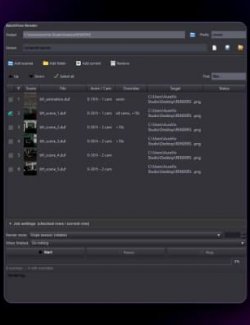
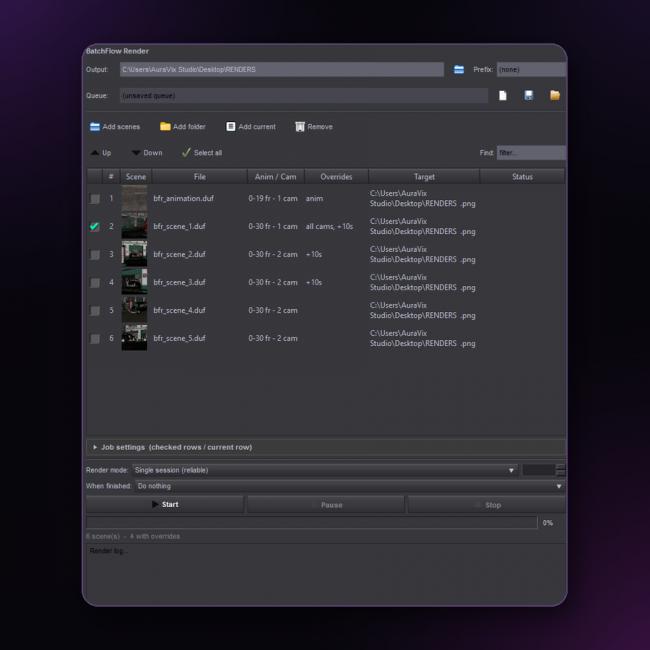
BatchFlow Render is unattended batch rendering, built right into DAZ Studio 6. Stop watching one render finish just to start the next — build a list of scenes (file picker, drag & drop, current scene, or a whole folder including subfolders), and let BatchFlow handle the rest.
Tune the output once and apply it to as many scenes as you want: format (PNG/JPG/TIF/BMP), a resolution override, and Iray stop criteria — Max Samples, Max Time, or an Exact mode that honors your cap precisely. Render a still, every camera, or a full animation as a numbered sequence. Send everything to one global output folder, or give individual scenes their own destination so a single run sorts characters, series or clients automatically.
Then press Start and walk away. Choose Single Session for speed, Restart Per Scene to fully release GPU memory on long batches, or Restart Every N for a hybrid balance. Live progress bars, a run log, and an automatic "when finished" action (close DAZ Studio or shut down the PC, with a 60-second safety cancel) mean you can queue it overnight and come back to finished renders. Save the whole setup as a reusable .bfq queue for next time.
============================================================
KEY FEATURES
Add scenes by file, folder (recursive), current scene, or drag & drop
Resizable table with thumbnail, Anim/Cam preview, overrides and live status
Per-scene output folder, format, resolution and filename prefix
Iray stop control — Max Samples / Max Time, with Exact mode
Render stills, all/visible cameras, or full animations as a sequence
Three render modes: Single Session, Restart Per Scene, Restart Every N
Auto-actions when finished: do nothing, close DAZ Studio, or shut down (60s safety cancel)
Save / load queues as .bfq profiles; live progress bar and render log
============================================================
SYSTEM REQUIREMENTS
DAZ Studio 6 (64-bit), Windows 10/11
Software: Daz Studio 6