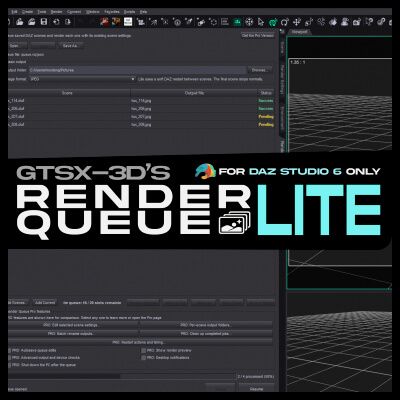
RENDER QUEUE LITE
Version 1.0.0
Created by GTSX-3D
----
UNLOCK EVERY FEATURE WITH RENDER QUEUE PRO
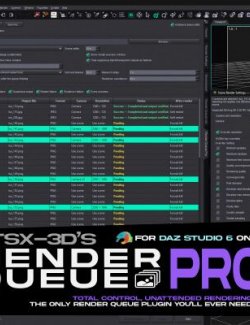
Render Queue Pro unlocks unlimited queue capacity, per-scene output settings, camera and resolution controls, Iray overrides, batch renaming, detailed render diagnostics, notifications, configurable restart actions, and automatic computer shutdown.
Render Queue Pro is available on RenderHub for a one-time payment of $40. There is no recurring subscription.
GET RENDER QUEUE PRO ON RENDERHUB
https://www.renderhub.com/gtsx-3d/gtsx-3d-s-render-queue-pro-for-daz-stu...
----
ABOUT RENDER QUEUE LITE
Render Queue Lite is a free render queue plug-in for Daz Studio 6 on Windows 64-bit.
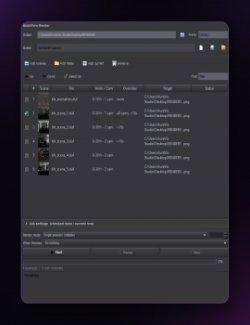
Add saved DUF scenes to a queue, arrange their order, choose an output location, and let Daz Studio render them automatically. Each scene is rendered using the camera, resolution, renderer, and render settings saved in that scene.
Render Queue Lite performs a soft restart between scenes so Daz Studio can release memory. The queue is saved before the restart and automatically continues after Daz Studio relaunches.
Render Queue Lite is free to download and use, with no subscription or time limit.
----
FEATURES
• Add multiple saved DUF scene files
• Add the saved scene currently open in Daz Studio
• Queue up to 20 pending, failed, or skipped scenes
• See exactly how many queue slots remain
• Remove and reorder queued scenes
• Select and move multiple scenes together
• Move scenes up, down, directly to the top, or directly to the bottom
• Choose a main output folder
• Choose JPG or PNG output
• Save and reopen render queues
• Render scenes using their saved camera, resolution, and render settings
• Check for unsaved scene changes before starting
• Suppress common decision dialogs during unattended rendering
• Keep informational scene-loading progress visible
• Display clear Pending, Loading, Rendering, Success, Failed, and Skipped states
• Pause the queue safely and continue it later
• Soft-restart Daz Studio between scenes
• Automatically continue the queue after restarting
• Finish normally after the final scene without an unnecessary restart
• Protect existing rendered images from being overwritten silently
• Free for personal and commercial rendering workflows
----
LITE EDITION LIMITATIONS
Render Queue Lite is designed for straightforward unattended rendering using the settings already saved in your scenes.
• Maximum of 20 pending, failed, or skipped scenes at one time
• One queue row renders one still image from the current frame
• Uses the camera, resolution, and render settings saved in each scene
• Does not modify the source DUF scene
• Does not support animation ranges
• Does not automatically create separate jobs for every camera
• Does not provide individual output folders for each scene
• Does not provide per-scene camera, resolution, or Iray setting overrides
• Does not provide batch output renaming
• Does not provide configurable actions between individual scenes
• Does not provide computer shutdown after queue completion
Render Queue Pro removes the 20-scene limit and unlocks the complete set of scene controls, output controls, diagnostics, automation options, and completion actions.
----
REQUIREMENTS
• Daz Studio 6
• Windows 64-bit
• Saved and readable DUF scene files
• The assets required by each scene
• An output folder with write permission
• Sufficient free disk space for the planned renders
Qt, the Daz Studio SDK, Visual Studio, and other development tools are not required.
Everything required to run the plug-in is included in the package or already provided by Daz Studio 6 and Windows.
----
INSTALLATION
1. Extract the downloaded ZIP file.
2. Close Daz Studio.
3. Copy these two files into the Daz Studio 6 plug-ins folder:
dsp_renderqueuelite.dll
renderqueuelite-restart.ps1
The default location is usually:
C:\Program Files\DAZ 3D\DAZStudio6\plugins
4. Keep the DLL and PowerShell restart helper together. Do not rename either file.
5. Start Daz Studio.
6. Open:
Window > Panes (Tabs) > Render Queue Lite
----
ABOUT THE RESTART HELPER
The included PowerShell helper is not an installer.
It is a readable text file that you can inspect using Notepad or another text editor. It is used only to wait for the correct Daz Studio process to close and then relaunch it so the saved render queue can continue.
The helper does not:
• Install additional software
• Connect to the internet
• Download files
• Collect or transmit personal information
• Modify the saved PowerShell execution policy
• Modify the Windows Registry
• Require administrator privileges
• Search for or close unrelated processes
Keep renderqueuelite-restart.ps1 in the same Daz Studio plug-ins folder as dsp_renderqueuelite.dll.
----
CHANGELOG
Version 1.0.0
• Initial public release
• Added saved-scene and Add Current controls
• Added a 20-scene queue limit
• Added a clearly visible remaining-slot counter
• Added queue saving and reopening
• Added multi-selection queue reordering
• Added Move to Top and Move to Bottom controls
• Added JPG and PNG output support
• Added automatic rendering with saved scene settings
• Added soft restart and automatic queue continuation
• Added unsaved-scene checks
• Added unattended handling of common decision dialogs
• Preserved informational scene-loading progress
• Added clear queue status indicators
• Added pause and resume support
• Added protection against silently overwriting existing renders
• Added normal completion after the final scene without an unnecessary restart
----
SUPPORT
Created by GTSX-3D
RenderHub creator page: https://www.renderhub.com/gtsx-3d
----
DISCLAIMER
Render Queue Lite and Render Queue Pro are independently developed third-party plug-ins. They are not affiliated with, sponsored by, or endorsed by Daz 3D, ManFriday, NVIDIA, or RenderHub.
Daz Studio and Daz Studio Premier are trademarks or product names of Daz 3D. NVIDIA and Iray are trademarks or product names of NVIDIA Corporation. All trademarks belong to their respective owners.