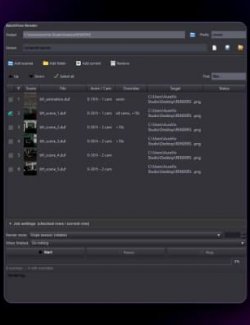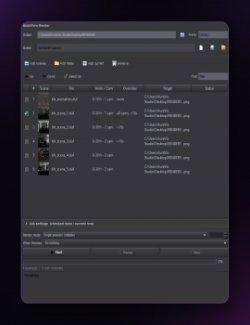
RenderSpool is a native, dockable render-queue pane for Daz Studio.
Stack up scenes, define what each one renders, and let the machine work
through the whole list unattended — including through the night — without a
subscription.
KEY FEATURES -----
- Native, Persistent Queue
A dockable pane, never a modal dialog. Queues are documents: New, Open,
Save, Save As, with a clear "unsaved changes" indicator so you never lose
work by accident.
- Three Ways to Build a Queue
Drag scenes straight from the Content Library, add them through a file
picker, or add the scene you currently have open with one click.
- Per-Entry Job Settings
Output folder, filename, and format (PNG, JPG, BMP, TIF) per entry — or
apply the same settings to several selected entries at once.
- Smart Output Naming
Build filenames from tokens — {scene}, {camera}, {frame}, {date}, {###} —
with a one-click insertion helper. Multi-camera jobs automatically get the
{camera} token added if you forget it, so different angles of the same
scene never silently overwrite each other. Name collisions within a run are
always caught and numbered ("_2", "_3", …); an optional setting also
refuses to overwrite files already on disk from before the run.
- Camera Modes
Render the scene's saved camera, hand-pick specific cameras from a list
read without opening the scene (with one-click Select all / Deselect all),
or render every visible camera automatically.
- Render Size Override
Force an output resolution without touching the scene's own render
settings — auto-filled from the scene, with an aspect-ratio lock so
resizing one dimension scales the other to match.
- Iray Canvas Override
For scenes that already have Iray render canvases configured, force them
on or off for a specific job — without editing the scene file.
- Animation Range Rendering
Render a first-frame-to-last-frame range as one continuous job.
- Runs All Night, Unattended (Daz Studio 6)
Daz Studio's Iray engine doesn't release VRAM between renders — on Daz
Studio 6, RenderSpool restarts the Daz Studio process automatically every N
renders (you choose N, or turn it off) and resumes the queue exactly where
it left off, so a long batch stays stable for hours. See "Known Limitation
(Daz Studio 4)" below for the Daz Studio 4 difference.
- Crash-Resume
If Daz Studio crashes mid-queue, RenderSpool picks the queue back up on the
next launch. Choose whether an interrupted job is re-rendered or skipped,
with a built-in safeguard that gives up on a job after repeated failures
instead of crash-looping forever.
- Persistent Run Report
A color-coded, per-job status report that stays on screen at the end of a
run — and survives a Daz Studio or Windows restart, so you never come back
to a lost summary.
- Quiet Through Blocking Dialogs
Known load/render warning dialogs are answered automatically at the Qt
level (not by clicking screen coordinates), so an unattended overnight
queue doesn't freeze on a stray popup. Every auto-answered dialog is logged.
WHO IT'S FOR -----
Any Daz Studio artist who renders more than one scene or camera angle at a
time and wants to queue it all up and walk away — without paying a recurring
subscription for the privilege.
REQUIREMENTS -----
- Daz Studio 6 (Qt6-based release) — use "dsp_renderspool_ds6.dll".
- Daz Studio 4.5+ — use "dsp_renderspool_ds4.dll".
- Windows 64-bit.
KNOWN LIMITATION (DAZ STUDIO 4) --------
The automatic "restart Daz Studio every N renders" feature has no Daz Studio
4 equivalent — the Daz Studio 4 SDK does not expose the API RenderSpool needs
to relaunch the application, so the restart slider and its settings are
simply not present in the Daz Studio 4 build's Settings panel. Everything
else — queue management, per-entry job settings, camera modes, render size
and canvas overrides, animation ranges, crash-resume, the run report, and the
shutdown-when-finished option — works the same on both versions. For very
long unattended queues on Daz Studio 4, keeping an eye on VRAM usage (or
splitting the queue into a few separate runs) is a reasonable substitute.
FAQ -
Q: During or after a render, I see a file called
"renderspool_discard_.duf" in Daz Studio's title bar or in
its Recent Files list. Is that a bug, or did it touch my scene?
A: It's expected, and your actual scene file is never touched. Rendering
changes a few of the scene's internal render settings in memory, which
makes Daz Studio think the scene has unsaved changes. To avoid that
triggering a blocking "Save Changes?" prompt during an unattended queue
(for example right before an automatic restart), RenderSpool clears that
flag by saving to a disposable, temporary file, then immediately deleting
it. Daz Studio's SDK offers no other way to clear that flag. One thing to
keep in mind: right after a run, your open scene's name will briefly point
to that now-deleted temp file — use "File > Save As" (not "Save") if you
want to save it back to your real file.
Q: I found a file called "renderspool-snapshot.json" in Daz Studio's
application-data folder — what is it, and is it safe to delete?
A: That's RenderSpool's crash-resume file. RenderSpool writes it to disk as
the queue progresses, so that if Daz Studio crashes or is restarted, the
queue can be picked back up automatically the next time you open Daz
Studio. It's deleted automatically once a run finishes normally, or when
you dismiss the end-of-run report. It's safe to delete by hand too — at
worst, you'll just lose the ability to resume a queue that was mid-run.
Its folder is configurable from RenderSpool's Settings (gear icon) if you'd
rather keep it somewhere specific.
Q: I clicked Stop (or Pause), but the render that's currently running keeps
going instead of stopping right away.
A: Daz Studio renders a job as a single call that can't be interrupted
partway through, so Stop and Pause always take effect once the current
job finishes, before the next one starts — never mid-render. For the same
reason, the "Per-job timeout" field in Settings is shown but currently
disabled.
Q: Why does Daz Studio close and reopen itself in the middle of a long queue?
A: That's RenderSpool's own doing, not a crash — Iray doesn't fully release
GPU memory between renders, so a long queue can eventually slow down or
run out of VRAM. RenderSpool restarts Daz Studio every N renders (your
choice, in Settings — 0 disables it) to clear that, and resumes exactly
where the queue left off, including your docked/floating pane layout.
This feature is Daz Studio 6 only — see "Known Limitation (Daz Studio 4)"
above.
Q: Could RenderSpool ever overwrite one of my render outputs by accident?
A: Within a single continuous run, no — RenderSpool always tracks every
output name it has already claimed and appends "_2", "_3", etc. on a
collision. There is one narrow edge case: that in-memory tracking doesn't
currently survive a crash or a scheduled restart, so if two jobs on
opposite sides of that exact boundary would produce the identical output
name, and "Prevent overwriting existing files" is left off (its default),
that specific collision wouldn't be caught. Turn that setting on in
Settings if this matters for your workflow.
CHANGELOG -------
1.0.0 - 2026-08-16
- Initial release.