Multiple Content Libraries v1.0 for Daz3D
Multiple Content Libraries is at the moment Windows-only (Windows 10/11, DAZ Studio 4.5–4.x, and DAZ Studio 6)
-AI was used for image creation and coding.
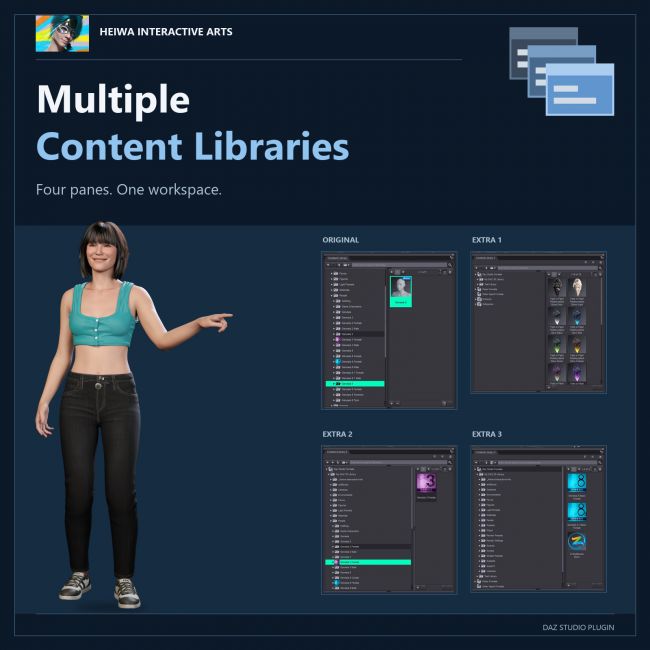
Multiple Content Libraries - Up To Three Extra Content Library Panes For DAZ Studio
Open up to three additional Content Library panes in DAZ Studio - real copies of
Daz's own pane, dockable anywhere, each one on its own folder, product or
category. Stop clicking back and forth in a single library.
ONE CONTENT LIBRARY WAS NEVER ENOUGH.
Characters here, clothing there, poses somewhere else, and the props for the
current scene in a fourth place - and DAZ Studio gives you exactly one Content
Library pane to reach all of it. Every switch means clicking back up the tree
and losing your place. Multiple Content Libraries ends that: it adds Content
Library 1, 2 and 3 to Window > Panes (Tabs), and each of them is a
additional instance of Daz's own Content Library pane.
THE REAL PANE, NOT A LOOK-ALIKE
- Each pane is created from Daz Studio's own Content Library class through
the official plugin interface
- Same speed, same thumbnails, same paging - because it IS the same code.
- Nothing in Daz Studio is modified. One DLL in the plugins folder, that's
the whole install.
EVERY PANE ON ITS OWN
- Each pane keeps its own current folder, selection and search.
- Each pane has its own Tree / List / Side By Side buttons, so one library
can be a tree, the next a column list, the third side by side.
- Each pane remembers its folder, view mode and panel sizes per Daz layout
and brings them back after a restart - even panes that stayed in the
background all session.
DOCK IT ANYWHERE
- Tab the new panes next to the original, dock them in any pane group, or
float them on a second monitor - Daz remembers the arrangement.
- Off-screen rescue: change resolution, unplug a monitor, undock a laptop -
a floating pane that would be stranded off screen is moved back to the
main display automatically.
WORKS EVERYWHERE
- DAZ Studio 4.5 - 4.x AND DAZ Studio 6: both native 64-bit plugin builds
included in one package.
- Windows 10 / 11, 64-bit.
-AI was used
Four content libraries. One click each. Never lose your place again.
Made by Heiwa Interactive Arts.
Software: Daz Studio 4